

 Every year, consumers across America push themselves away from the Thanksgiving table and hit the stores in search of Black Friday deals. Some even camp out for days in hopes of securing a fantastic deal. Although many people believe that the day after Thanksgiving is the biggest sales day for retailers, that honor, according to Time.com, typically goes to the day before Christmas when the panic-stricken and the procrastinators are frantically looking high and low for a few last-minute purchases.
If you decided to skip Black Friday this year but are still looking for bargains, don’t fret. There will be plenty of time after Christmas to pick up the items you wanted for much less than full price.
Wait to Buy Electronics
If you really want a certain electronic item, but don’t need to have it before Christmas, then the Christian Science Monitor recommends waiting until after the Consumer Electronics Show in January. Prices for electronics typically drop not long after the public gets a look at the new models that will soon be hitting store shelves.
Jackets and Winter Clothing
If you’ve had your eye on a jacket and you can tell there is plenty of inventory in your size, take a gamble and wait. According to Boston.com, the prices of cold weather-related clothing typically drops dramatically after Christmas. Of course, there is always a chance that last-minute Christmas shoppers will snatch up the item you wanted and that you’ll be greeted with an empty rack on the 26th. If that happens, don’t despair. You can always search for the item online. For example, if you really love a pair of two-tone boots at Macy’s, but your size is no longer available when you visit your local store, check Macy’s website, which may still have what you’re looking for.
If you don’t find your size online, re-visit your local store in a week. Remember, after Christmas is a notorious time of the year for returning gifts and, with any luck, you may find that someone has returned the item you’ve been lusting after.
Groupons and Living Social Deals
These social network websites offer coupons for goods and services. Typically, you will pay half of the actual cost of the item being offered by these sites, which means that you can stretch your dollars even further when you hit the sales floors.
Travel
The period after the holidays and before Easter is one of the best times of the year to find travel bargains, according to CNN.com. People tend to travel less during the winter months, kids are in school and most people are still feeling the pain of the Christmas binge spending. If travel was one of your Christmas wishes, then wait until after the 25th to book. By doing so, you will typically be able to find great deals on flights, hotels and attractions, such as Disney.
Cars
If you didn’t get a car with a big red bow on it in your driveway, then head to the dealerships. Because the dealers and salespeople will be trying to meet their sales goals, you will find the best bargains on autos at the end of the year, according to USA Today. In addition, the dealerships are eager to clear their sales floors to make room for the new year’s models, so you’ll find great incentives at this time of the year to purchase a car.

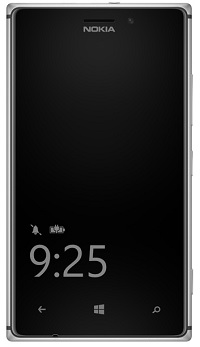 The Nokia Lumia Black software update will start to roll-out for Nokia Lumia WP8 owners around the world from today. The update brings new features, improvements in imaging, new apps and app updates from Microsoft and Nokia to make the Lumia smartphone experience even better.
The main features brought along with the update from Nokia include:
- App Folder. This brand new feature makes your Lumia experience even more fluid by giving you an option to further personalize and organize your Start screen. With App folders you can group similar apps and settings into one folder, a tile, on your Start screen.
- Nokia Glance screen 2.0. Helps you keep track of information in real time, making all your most important notifications including: phone, messages, email, outlook, calendar, or any apps that use notifications such as Twitter, Facebook, Whatsapp, or games; always visible at a glance on your screen. It saves time and energy.
- Bluetooth LE. Will now be enabled across the full Windows Phone 8 Lumia range for compatible gadgets like the Adidas MiCoach accessories.
- Nokia Refocus. The amazing Nokia Refocus comes to all Windows Phone 8 Lumia smartphones with 1GB of RAM and upwards.
- Nokia Beamer. Sharing what’s on your phone is easier than ever with Nokia Beamer. You can now beam documents, presentations, anything you like, to any HTML5-enabled screen by simply scanning a QR code on the screen. It’s coming to all of the phones with 1GB RAM upwards.
- Nokia Storyteller. The app arranges your photos for you, by date and by place, making it easier to tell the stories behind your pictures, and give extra context through the close integration of interactive maps.
- Nokia Camera. Combines Nokia Pro Camera and Smart Camera to simplify the photo-taking experience, and ensure you get the perfect shot every time. The app has been available for Lumia PureView smartphones since last year, but it’s now coming to the rest of the WP8 Lumia range. The latest Nokia Camera update also brings raw DNG support for Lumia 1020 owners.
- Latest generation of imaging algorithms. The Lumia Black update further improves the image quality, especially in Lumia 1020. Among others, the improvements include a new oversampling algorithm, making your images more natural looking with reduced noise, while ensuring your photos remain wonderfully sharp.
The Lumia Black update also brings a series of enhancements from Microsoft to Nokia Lumia smartphones. These include safe driving mode – which cuts out unnecessary distractions when you’re on the road; customised ringtones for each contact. You can now also close apps within the in multitasking view and lock the screen rotation if you wish.
Timings: The Lumia Black update has begun rolling out today for Lumia 1020 and Lumia 925 smartphones, with other models in the range following in the coming weeks.
How to update: Nokia Lumia smartphones automatically check for updates every week, and will notify people when it finds one. Otherwise check by going to Settings -> Phone update – it downloads and installs straight from that screen.

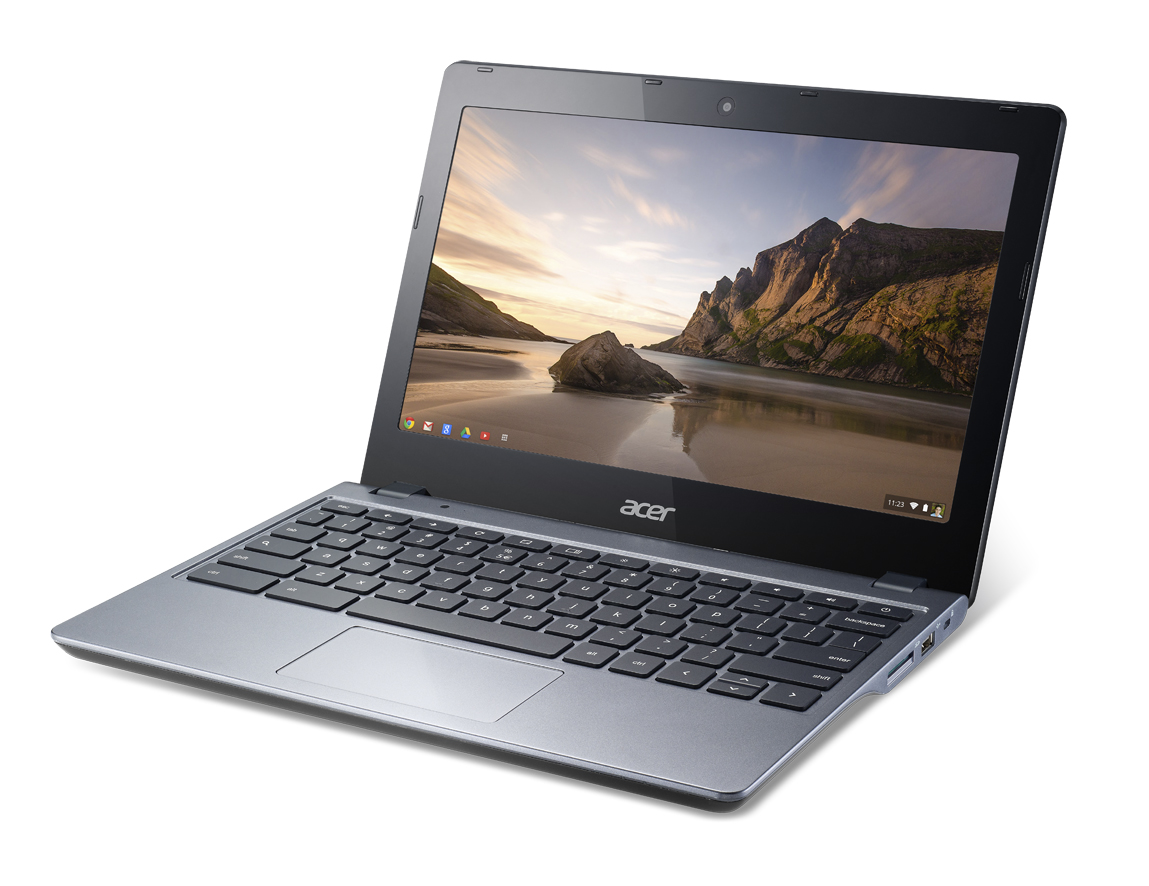 The Chromebook of the moment has got to be the Acer C720. Currently being released in a number of different configurations featuring various amounts of RAM and storage, touchscreens and now colours.
Acer seem to have hit upon a winning combination of value, power and quality. What new edge does the Acer C720 bring to the table, despite options? Well, not a lot to be entirely honest, in terms of specification it’s really on par with all the other Chomebooks out there at the moment. However, the C720 does offer great value for money and seems to be the solid choice.
As always, I’m starting off the review process by recoding an unboxing video, which you’ll be able to see below. Here I’ll be showing off the hardware as well as taking a look at the OS and UI once we’ve booted up. A process that takes seconds!

 Google have expanded their Google Takeout service. Previously, most of us had used Takeout to export our feed archives from Google Reader before the big shutdown last year, a shutdown many still mourn to this day. However, Google made switching to an inferior RSS client the relatively easy. It seems tha they have now expanded the service to all you to back up 18 of their services locally.
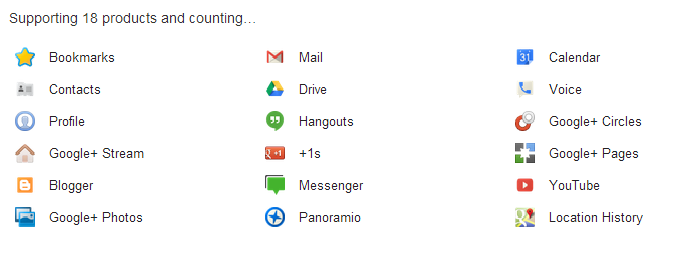
A handy feature that might just help those with concerns about storing everything in the cloud and somehow feel their trusty 7 year old USB Hard Disk is a safer place than Google’s own multi-billion dollar facility. Doing a back up really shows a frequent user just how much information they put up there, privacy sceptics will be flipping out.

 TV lovers will be excited to hear that Amazon is filming all of its original drama in 4K UHD quality for LOVEFiLM. 4K UHD is a relatively new technology which provides viewers with exceptional clarity and definition, using four times as many pixels as FULL HD. The enhanced detail means that even with very large television screens the definition is not compromised.
Extremely high definition on a grand screen might sound like TV heaven, but up until now there hasn’t been much for 4K UHD televisions to watch. Some 4K televisions come loaded with material shot in 4K to showcase the technology, but more content filmed in 4K is needed. That’s why audio/visual enthusiasts and TV fans will welcome the news about Amazon and LOVEFiLM.
The director of Amazon Studios has said, “All of the pilots and series we produce next year will be shot in 4K. That includes our first ever drama series that we will green light next year. We think customers are going to love watching these series in the highest resolution ever available to consumers and we can’t wait to deliver it.”
Advances in encoding technology (which enables audio and visual material to be downloaded) means that 4K UHD television and movies can now be streamed quicker.
Next year Amazon will be producing five new television pilots which viewers will be asked to watch and give feedback on. Once piloted, they will get made into a series filmed in 4K UHD and be available to stream on LOVEFiLM. The pilots include Chris Carter, creator of the X-files, show ‘The After’, ‘Bosch’- a series based on the Harry Bosch book series- and ‘Mozart in the Jungle’ from critically acclaimed director Roman Coppola.
This development is great for online streaming customers, even if they are not yet on the 4K UHD bandwagon. 4K ultra high definition is set to be this year’s big audio/visual technology story and with not much content out there, Amazon have got a head start. 4K UHD will only become more popular and it’s good to know that when there is more content available.

 Gareth and Matt are here with another UK update on the mobile front. Unboxings galore and a look at some of the major announcements from CES 2014.
The first podcast of a new year sees CES in full swing so there’s plenty to talk about this week and plenty to catch up on following a long Christmas and new year break.
Gareth tells us all about his new Chromebook and Matt goes on a rant about Google Glass…
Featuring Gareth and Matt

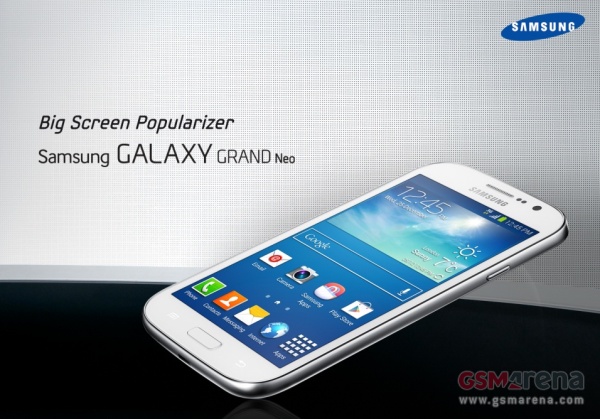 So Samsung has the Note III, the Grand 2 and the S4. Three pretty huge phones that cover almost all needs. Aside from the obvious gap that the Grand Neo is there to cover. The Galaxy Grand Neo will come with a 5-inch TFT display with a resolution of 800 x 480 pixels. Under the hood, there is a 1.2 GHz quad-core A7 chipset powering the smartphone along with 1 GB of RAM. A 5 megapixel rear camera with LED flash and the front facing VGA shooter completes the camera department, while the 8GB internal memory along with the microSD card slot takes care of storage.
The connectivity options of the Samsung Galaxy Grand Neo include Bluetooth 4.0, HSPA+ (21Mbps down, 5.76Mbps up), WiFi 802.11 b/g/n, Wi-Fi Direct, micro USB, GPS and GLONASS support. However, there is no LTE or Wi-Fi ac radios built-in.
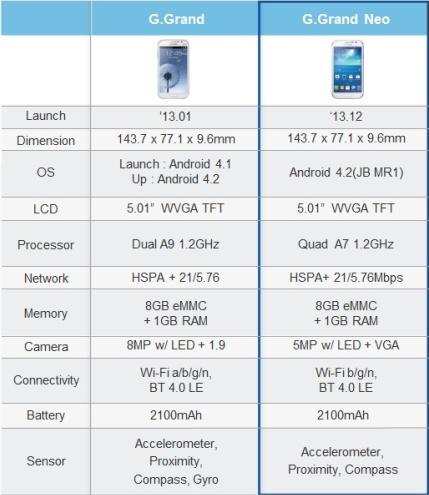
So essentially the Grand Neo is a “budget” slab that bests the original Grand in some departments without being the full upgrade the Grand 2 is.

 The use of virtual desktop infrastructure (VDI) solutions means businesses can operate with more and more of their data being stored and rendered accessible via external data centers. As a consequence, disaster recovery processes and the planning involved has become much more straightforward and reliable.
Getting Back Up to Speed
A growing number and variety of services provided by and relied upon by businesses are data intensive. Often these services are essential for business continuity and so their reliability and security is paramount for the companies involved and for their customers.
VDI technologies and solutions like those from Dell serve to limit an organization’s vulnerability to IT and data service downtime, even in the event of severe conditions or a potentially disastrous scenario. Plus the use and integration of VDI means businesses can get their operations and their most critical data-related functions back up and running more rapidly than with more traditional IT set ups.
Benefits of Virtualization
Innovations in virtualization technologies and expanded use of cloud computing solutions have had a huge impact on the way businesses operate and aim to optimize how they meet customer demand. Improved business continuity and a more robust disaster recovery potential is an important part of the equation and a key advantage of virtualization.
Virtualization and cloud computing take business IT from being a capital investment issue to being considered more as an operating cost. Establishing a VDI also benefits businesses simply because such a system puts operationally important data in the cloud, where it is no longer vulnerable to the impact of physically devastating phenomena like earthquakes, floods or a terrorist attack.
Planning for the Worst
No organization or business can anticipate what might be a disastrous scenario but they can always benefit from planning for how they would recover under even the most terrible circumstances. Virtualization makes key IT functions more secure and accessible on a day-to-day basis and under extreme conditions, which of course makes disaster recovery more manageable and potentially far less damaging.
Data-related downtime can eventually cost companies across a huge range of industries some enormous sums of money, as well as very significant reputational damage. Virtualization of desktops and infrastructures protects against such outages and can cut costs for businesses in the short term as well.
As part of the Dell team, I very much recommend investigating our VDI and cloud computing solutions further via our website at dell.com.
This article was written by freelance writer and mother of three, Kathryn Thompson. Follow her on Twitter: @katht35

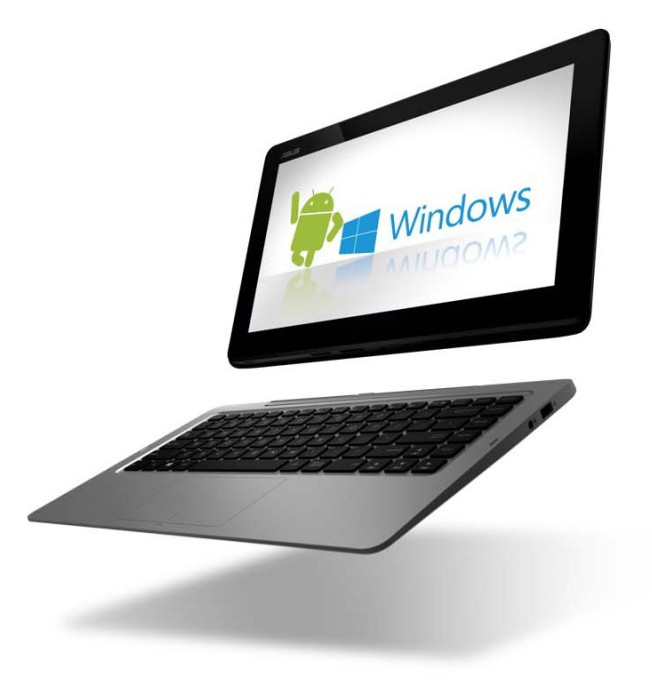 The new Asus Transformer Book Duet seems to be the real deal that many have promised over the years in that it can go from Windows 8 to Android literally at the flip of a switch (actually push of a button). Press the OS switch button on the Duet’s keyboard dock or tap the app on the touchscreen and it takes approximately 4 seconds to make the jump. Thanks to the Duet’s Intel Core i7 processor the Duet is plenty speedy. A list of other features show this ASUS as quite the capable 2-in-1 device.
A little more detail from their press release reveals:
ASUS Transformer Book Duet (TD300) delivers striking visuals on its 13.3-inch 1920 x 1080 Full HD IPS touchscreen display. This multi-touch display has a sensitivity and responsiveness that exceeds Microsoft’s requirements for Windows 8.1. For audio, it comes with ASUS SonicMaster technology for true-to-life sound through the tablet’s twin speakers.In addition, Transformer Book Duet has a front-facing HD camera with a built-in digital mic for video chats. The tablet display has 128GB of SSD storage which can be supplemented by a 64GB Micro SD card, while the keyboard dock houses a 1TB hard disk drive. The dock is also home to USB 3.0 and USB 2.0 ports, a LAN port, and HDMI 1.4 output with 1080p support. In terms of connectivity, ASUS Transformer Book T300 has 802.11ac Wi-Fi and Bluetooth 4.0 with EDR.
It looks to be a pretty incredible 2-in-1, but my problem lies in the choices of Operating Systems. Before anyone gets ahead of me I’d like to say that I love both Android and Windows 8. I own a Nexus Tablet and have been using Android since ’09 with the OG Droid. I also own a Dell XPS 12 Ultrabook running Windows 8.1, so I’m very familiar with both OSs and appreciate them both equally. I also own a Lumia smartphone running Windows Phone and this is where my problem with the operating systems comes into play. As an Android user you will probably understand this issue I have with a Windows and Android duel boot machine.
I’m pretty much “locked” into the Windows 8 ecosystem. I use the word “locked” loosely because I’m really not locked into the ecosystem, I choose to use all the services just as I did when I was on Android. I can go back to Android in a matter of minutes without any real disruption, but why would I want to or need to? I have no real need to boot into Android. As a matter of fact, my tablet rarely gets any use beyond using Hangouts, so I just don’t have the need for a dual boot of Android and Windows. Android/Ubuntu yes, Windows/Ubuntu yes, Android/Windows no.
This issue will be further exaggerated when it comes to a dual boot smartphone running both Android/Windows (if it ever happens). To fully enjoy either OS, you really have to jump right in and get wet. Having one foot in Android and one foot in Windows is castrating the experience. Either you’re in or your out and most people are all in. Whether it’s iOS, Android or Windows Phone, consumers are tied into one ecosystem. In theory it looks interesting, but in practice it falls way short. Perhaps it’s just me. Perhaps there is a real market for Android and Windows running side by side with a press of a button or flick of a switch, but for me I’m just not seeing it right now. Android is quite capable of existing on it’s own just as Windows (Phone) is capable of doing all the lifting on it’s own.
 When Windows 8 was revealed to the public back in October 2012, there was a burning question floating around – where’s the notorious Windows Start menu? The update had not only shocked everyone with its multi-functioning operating system, touch-screen compatibilities and bright Live Tiles but it had also omitted some of the most well known functionalities synonymous with many computers whether they’ve been bought from the high street or online from retailers like ebay.co.uk.
The sudden disappearance of the Windows Start menu, previously seen in Windows 7, was met with mixed reviews, prompting Microsoft to rethink. Like all successful companies, they listened to customer feedback before releasing the first major system update aptly named Windows 8.1 in October 2013. This saw the reintroduction of the Start button allowing users easy access to other parts of the computer system including the Control Panel and Task Manager – but the full features of the Start menu are still missing.
With Microsoft 8.2 (apparently codenamed Threshold), expected some time in the near future, many people have been speculating the changes that might occur. Of course, the Windows Start menu has been top of the list with bloggers and computer fanatics suggesting the full menu will indeed make a comeback. After all, it’s the next logical step isn’t it? According to Winsupersite, the next version of Windows will let users run Metro apps in floating windows on the desktop and reintroduce the Start menu on products that support the desktop.
So, with this in mind, maybe one day we’ll have an upgrade with a good old Start menu that can do all its regular tricks such as start programs, open commonly used folders, search for files, folders and programs, adjust computer settings, get help with the Windows operating system, turn off the computer, log off from Windows/switch to a different user account. Or perhaps we’ll get a Start menu that’s completely different and spark another wave of computer related fury.
For now, however, Microsoft are keeping their lips tightly sealed so we’ll have to just be satisfied with the state-of-the-art, high-tech Start screen that stands in place of the Start menu – and is it really that shabby? Sure, it might take a bit of getting used to (all new things do), but with the ability to pin, group, rename, order and resize an array of apps at your leisure, Windows 8.1 displays an array of clever technology and is designed to make your life a bit easier. The interface can be used with a keyboard and mouse or as a touch screen (depending on the computer you buy) and allows you to do everything from retouching photos to creating slide shows and playlists.
– This article was written by freelance writer and mother of three, Kathryn Thompson. Follow her on Twitter: @katht35
Connect
Connect with us on the following social media platforms.