

 According to an article over at iLounge, T-Mobile Netherlands have confirmed both the RAM and processor specs for the new iPhone 3G S through its specifications page. According to the page, the iPhone 3G S sports 256MB of RAM — up from 128 in the original iPhone and iPhone 3G — as well as a faster processor running at 600MHz, compared to 412MHz in the first two iterations of the device. The second-generation iPod touch also sports a faster processor than that found in the first two generations of iPhone, running at 532MHz.
via iLounge
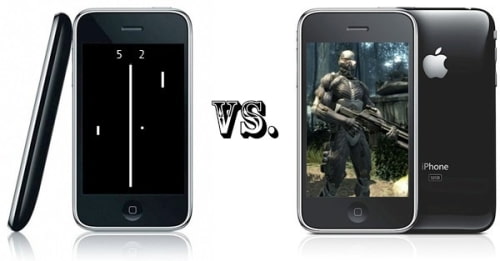
 The iPhone 3G S will support OpenGL ES 2.0 however, the iPhone 3G does not.
This is the subject of an Engadget article which notes the graphics processor in the iPhone 3G S (PowerVR SGX) supports hardware acceleration of both OpenGL ES 1.1 and 2.0 while the graphics processor in the iPhone 3G (PowerVR MBX) only supports OpenGL ES 1.1.
The real issue here is that games or applications produced for OpenGL ES 2.0 will not simply look crappier on the iPhone 3G, they won’t play at all. OpenGL ES 2.0 and OpenGL ES 1.1 are not compatible whatsoever.
This means that developers may need to pick one standard to develop for. Either they can code a version for OpenGL ES 1.1 which will play on both devices, they could code two versions of the same game which is a lot more work, or they could only code an OpenGL ES 2.0 version which will not be available to iPhone 3G owners.
Currently most applications in the App Store are available across all devices with the iPod touch being an exception in some obvious cases. The improvements in graphics and processing power might cause a rift in the App Store where certain games are only available on the iPhone 3G S. These of course would likely be the better more exciting applications leaving a lot of iPhone 3G customers in the dust.
via iclarified

To start this review I would just like to say, the XDA Guide is like revisiting an old long lost friend, being a long time XDA Orbit user and being more than happy with it, I was interested to see if the new revitalised version can prove itself in this competitive market.

The O2 XDA Guide aka HTC Touch Cruise 09
As Matt mentioned this device appears at the moment to be released as an exclusive to O2, so is there enough reasons to warrant switching over to them? Edit: I notice they are starting to appear on the web now as well.
Following on from the likes of the HTC Touch Cruise, TC2, 09 etc and Orbit 2. This device unofficially is being touted as the Orbit 3, or is that Iolite, call it what you will, here are my thoughts on the device.
Firstly, the Orbit 3, sorry, Guide box, it has to be said the box is huge! And comes in as a 15+cm cube. Fortunately this is to allow for the array of accessories that are included as standard. There are 2 separate boxes included in an outer wrapper, details and views of which can be found on Matt unboxing video.
What’s in the box?
In the 1st Box, can be found:
- The Xda Guide
- A spare rather small and thin non telescopic stylus
- A mesh type slide in case
- MiniUSB connecting headset with inline controls for phone and player
- AC adaptor that connects via the USB charge cable, and includes a UK adaptor
- There is of course a MiniUSB to USB cable.
- CoPilot Live 7 installed on a 1gb microSD card and a registration card
- Quick start guides for the XDA and CoPilot Live
- CD ROM for ActiveSync, Outlook 2007 trial etc.
The 2nd box contains:
- In Car charger for the cigarette lighter
- A windscreen suction holder complete with
- An XDA cradle for attaching to the suction holder
A very nice touch again from O2 to include the accessories as standard, I think someone must have nicked the screen protector though?!
Have a look at Matt’s O2 XDA Guide unboxing video for more.
O2 XDA Guide (HTC Touch Cruise 09) Specification:
- Processor – Qualcomm® MSM7225™, 528 MHz
- Operating System – Windows Mobile® 6.1 Professional
- Memory – ROM: 512 MB/RAM: 256 MB
- Dimensions – 102 X 53.5 X 14.5 mm (4.02 X 2.11 X 0.57 inches)
- Weight – 103 grams (3.63 ounces) with battery
- Display – 2.8-inch TFT-LCD touch-sensitive screen with QVGA resolution
- Quad-band GSM/GPRS/EDGE – 850/900/1800/1900 MHz
- HTC TouchFLO™
- 4-Way Navigation Wheel with Enter button
- HTC Footprints™ button
- Internal GPS antenna
- A-GPS capable (service provided by Google)
- Bluetooth® 2.0 with Enhanced Data Rate and A2DP for stereo wireless headsets
- Wi-Fi®: IEEE 802.11 b/g
- HTC ExtUSB™ (11-pin mini-USB and audio jack in one), full-speed USB 2.0
- 3.2 megapixel colour camera with fixed focus
- Rechargeable Lithium-ion battery Capacity: 1100 mAh
- Talk time – Up to 400 minutes for GSM
- Standby time – Up to 330 hours for GSM
- microSD™ memory card (SD 2.0 compatible)
- Includes proprietary in-car holder
- Photo geotagging
General
On the top there is the power on button and you can also see the stylus holder.

O2 XDA Guide top view
The left hand side is just the single button up/down volume rocker.

O2 XDA Guide left side
The bottom of the Guide is the miniUSB housing underneath which you can just make out the back cover release recess, and a mic.

O2 XDA Guide bottom view
The right hand side has…nothing….no dedicated camera button…just the rest of the stylus holder mentioned in the top.

O2 XDA Guide right side
The rear of the unit again kept really simple has a small lanyard hold at the bottom, a speaker slot and the 3.2 MP camera, again missing any kind of flash or self-portrait mirror.

O2 XDA Guide back view
On the front of the flush screen, is the 2.8” QVGA 320 x 240 (Yes QVGA, please in this day and age?) screen. Under which from left to right is a Navigation button to launch CoPilot and call button, when long pressed activates voice dialling, next to which is the 4 way navigation wheel and enter button, and finally on the right is a dedicated ‘Footprint’ button above the call end key, which when long pressed locks the screen.

O2 XDA Guide front view
Highlights:
- Great shape and design
- Included extras
- NaviPanel
Lowlights:
- Only a QVGA screen
- No screen rotation
Software
The Guide utilises the Windows Mobile 6.1 Professional, which has the normal programs including a few extras such as Opera, Google maps, QuickGPS, Office Mobile, Windows Live and Messenger, Adobe, Footprints, Remote Desktop, RSS Hub, and You Tube, and of course TouchFLO.
The 2 main ones that make the XDA Guide standout more than most are the nifty NaviPanel and the Footprints, included in the TouchFLO application.
NaviPanel cleverly kicks in when you cradle the device into the supplied holder and presents you with 6 large button for quick and easy access to the handy functions needed while cradled. Straight away it asked if I wanted to connect with my Bluetooth car kit,


Once done it then presents a Footprints shortcut icon, covered next, a Phone launcher, and the other 4 buttons launch the CoPilot Live 7 in each area as indicated. Quite clever really and I wish I was clever enough to figure out how it does it, can someone enlighten me? Surely this has a multitude for other uses, like auto shut off and so on?
Secondly as Matt mentioned, ‘the new HTC Touch Cruise is the first mobile phone to offer HTC Footprints, an application experience that enables people to permanently chronicle their special moments by capturing a digital postcard on their phone. Once captured, Footprints provides the ability to take notes and an audio clip of that favourite restaurant or special place while identifying its specific geographical location. In addition to identifying each postcard with its specific GPS co-ordinates, Footprints also auto-names each postcard with its general location or area.’
In reality it is a nice little app for being able to add more details to your ordinary snaps such as Phone numbers, notes, voice note or to navigate to, this will probably work really well for the snap happy but for me I found relatively little use for it, and for me it seems strange to have a dedicated ‘Footprint’ button the front of the device, and not others more commonly used. However it does launch Footprints which at least launches the camera function.

Small note here about CoPilot which I have reviewed in more dept in the past, don’t forget to run QuickGPS and keep it up to date, I found that on the test device, without running QuickGPS at all the Sat Nav never did pick up any satellites and I had arrived at my destination unaided, following the update it lock on very quick and was really accurate too boot.
Review
As I mentioned my previous device of choice as the XDA Orbit, before that one last alteration which completely destroyed it, (Lesson: Don’t take these things apart if you don’t know what you are doing.) and eventually sold as scrap.
I wanted an all in Sat Nav, PDA, and phone etc.etc. which was why I had plumped for the Orbit. On removing the XDA Guide from the box straight away the improvements are immediately visible. At 102 x 54 x 15 mm it is a great size, smaller than the Orbit which was 108 x 58 x 17 mm. It fits well in the hand and the rounded, smooth, flat sides feel nice to hold and comfortable in the hand, big enough to be functional but not so big to be cumbersome.
The detail on the device make it look very smart and stylish, it is solid, polished and very positive in all aspects for me. One of the big failings or the previous model was the lack of memory, and that it only had a 200 MHz processor. Really good to see the major improvements on this device with its Qualcomm® MSM7225™, 528 MHz and ROM – 512 MB, RAM – 256 MB upgrade.
A pet hate for both Matt and myself is the position of the reset button, why is it underneath the casing? I might as well take the battery out to reset, one day maybe…

O2 XDA Guide microSD card slot and reset button
On opening the XDA I found the SIM housing a bit fiddly to deal with as it is pretty much flush with the casing and difficult to slide the SIM out once inserted, however there is a small slot next to the camera which can be used to poke out the SIM with the stylus. Replacing the cover gives a good reassuring click as you snap it back on.
The microSD card although not hot swappable from the outside is easily accessed once the back is off, without the added burden of removing the battery.
For me also being an XDA Ignito user the screen is OK but I do prefer the VGA version that I have lived with for some time now, having said that it is completely useable and can be brightened by unchecking the ‘auto adjust backlight’. I had no complaints about the responsiveness of the unit in day to day use.
The next and biggest gripes with the screen are the missing accelerometer preventing landscape screen rotation, probably due to the NaviPanel mentioned earlier, and the shininess. I found that using the CoPilot in the position where I always cradle my Sat Nav was completely useless in bright sunlight, whilst recently on holiday I had to stick a business card in the holder to shade the screen so that I could see it. I also tried had to revert to the supplied holder which means due to the position of my cigarette lighter meant I couldn’t charge it!
The call quality was very good, except in particularly bad conditions, it was not the best in this area as I find other devices such as my Ignito manage slightly better, but the calls are loud and clear with the right conditions.
The cameras are quite well know as not a major strength on these types of HTC devices, it is functional and useable, but not the best, the pictures wouldn’t impress Matt and it certainly doesn’t replace a normal digital camera, I found that in low light there is a definite lack of quality and no flash to compensate, either.
For those who what to use this as an actual phone and texting machine, the phone functions are fairly Windows/HTC standard, the texting abilities are also the same, and one of the reasons I personally, prefer to use TouchPal as my input method of choice.

Conclusion
I have enjoyed having my old friend back, this has been one of the first devices that I have tested in a while, where a few of my colleagues have commented at how neat and tidy it looks, one of my technophobe friends even commented how easy it was to use! The beefed up spec and a few little quirks make this reliable device very easy to live with on a day to day basis, and the small form factor is an added bonus.
It seems that of the ones that are slowly becoming available on certain auction sites, the price is about right as well. If you can’t afford £500 for the Touch Pro2 then have a look at the XDA Guide.
Final personal point – A little off-topic but I would like to thank Tracy and Matt publicly for their generosity in sponsoring me on my upcoming London to Paris cycle ride. (9-13th September)
I was really disappointed with the results of my recent appeal for cash on www.tracyandmatt.co.uk as I am riding for a great cause in ‘Make-A-Wish’ and could really do with some extra support from the rest of you, to date I have not had one other donation.
You can donate on my web page www.justgiving.com/steve-wilson, so come on guys, ANY amount will make a difference so please don’t be shy. (Sorry about the photo, it was a bad day, and I am getting better.)
Review by: Steve
[ Post Tags: O2 XDA Guide, HTC Touch Cruise 09, Footprints, Windows Mobile, tracyandmatt.co.uk ]
So if the rumours are correct it looks like Samsung will soon be launching the update to the original Omnia and it will be called the Omnia 2 or i8000.
If the info is to be believed: a 3.7-inch AMOLED touchscreen with 480×800 pixel resolution, 8.1-megapixel LED flash camera, Wi-Fi, DivX and Xvid support.
Also there is a video after the break and hopefully this is an early ROM as the phone runs like a dog and looks just an awful experience.


Many people across the country eagerly waited in line to get their hands on the most anticipated handset of the year, the Palm Pre. While the overwhelming majority of people who took a Pre home with them are counting on it to be their reliable companion for the foreseeable future, the people at Rapid Repair were merely interested in taking it back to their offices and ripping it apart. So what did we learn other than the fact that disassembling a Pre is best done by people who really, really know what they’re doing? Pre components are worth about $170 — a massive leap above the iSuppli estimate of $138. In other words, it’s probably best to actually have a unit on hand before estimating its production cost. Just a thought.
Via BGR

 So after all the excitement of yesterdays iPhone announcements, O2 the exclusive Apple partner for the iPhone in the UK has destroyed the buzz for all current iPhone 3G subscribers. To upgrade my iPhone 3G to the new iPhone 3GS I have to pay the remaining 6 months of my contract off then sign a new 18 month contract and pay a minimum of £175.00 for the 32GB flavour.
So lets do the maths, 6 x £45.00 + £175.00 would give a cost to upgrade of £ 445.00 or at today’s exchange rate $717.00.
I understand that a contract was signed for 18 months but as a loyal O2 customer they could offer a little sweetener to help the early adopters, twitter is awash with complaints aimed squarely at O2’s twitter presence and so far they have patronised us with poor responses.
I have now made my decision and it has been hard to come to, I will not be upgrading to the iPhone 3GS it’s just not worth the money and I cannot bring myself to commit any more of my hard earned money to a network that obviously does not understand it’s customers or the old adage that a new customer costs 3 times more to win than to keep an existing one.
And don’t even get me started on tethering charges, £14.68 for 3 Gig or £29.36 per month for 10 Gig, not bad when your already paying for unlimited data as part of your iPhone contract.
So the iPhone killer never appeared as hardware but actually from one of it’s supposed allies #02Fail

We first saw the original LG Viewty over 18 months ago and surprisingly that handset remains popular today and is still offered by many of the mobile networks both on-contract and on PAYG.

The new LG Viewty Smart (LG GC900)
When LG announced the new version of the device, the LG Viewty Smart, I’m sure that a large number of Viewty owners were pleased with the news and will be looking to upgrade. The new handset offers a larger and higher res touchscreen display as well as an improved 8 megapixel camera, TV output (with additional cable), AGPS, photo geotagging, Google maps, etc.
Naturally we’ll have a full review for you within the next week or so but until then you can check out my LG Viewty Smart unboxing video below.
LG GC900 Viewty Smart – Smart Photography.
Take pictures with razor sharp detail, thanks to the 8 mega-pixel camera, autofocus and high quality Schneider-Kreuznah lens. The high ISO 1600 sensitivity and included LED flash lets you take images even in poor lighting conditions. Face detection, smile shutter and a host of other advanced camera options makes sure your photos always look their best. On-board AGPS geo tags your photographs, letting you see where and when your photos were taken.
LG GC900 Viewty Smart – Smart Video.
Not just for stunning still images, experience exceptional video with the LG Viewty Smart. Record video in DVD quality or choose slow motion video for fast moving objections. Support for a wide selection of movie formats, like DivX, lets you simply drag and drop your movies to watch.
LG GC900 Viewty Smart – Smart Display.
See things different with the LG Viewty Smart. The large 3" high resolution WVGA display brings your photographs and movies to life. Wide-screen support lets you see your movies in wide-screen, view complete web pages or just view photographs in pin sharp detail.
LG GC900 Viewty Smart – Smart Interface.
Make using the LG Viewty Smart easy, thanks to the innovative S-Class interface. Use simple gestures to access common features and options. Rotate your finger while taking a picture to zoom, double tap to expand web pages, or simply swipe your across the screen to move through your photographs.
LG GC900 Viewty Smart – Smart Information.
Support for widgets, brings information to you, see the weather or news as easily as checking for missed calls. A built in web browser brings the internet directly to you hand while haptic feedback provides subtle vibrations to confirm on-screen actions.
LG Viewty Smart specification:
- Dimensions: 108.9 x 56.1 x 12.4mm
- Weight: 102g
- Battery:
– Talk Time: 4 hrs
– Standby Time: 350 hrs
– Capacity: 1000 mAh - Display:
– 800 x 400 pixels/3 inch
– Touch Sensitive
– Haptic Feedback - Network:
– GSM: 850/900/1800/1900 (Quad-Band)
– WCDMA: 900/1900/2100 (Tri-Band)
– HSDPA (7.2Mbps) - Camera:
– 8 mega-pixels (auto-focus)
– Digital Zoom
– LED Flash
– Schneider-Kreuznach Lens
– Image Stabilization
– Geo Tagging
– Smile Shutter
– Multiple Face Detection
– Panorama Shot
– Continuous Shot - Video:
– Hi-Resolution VGA Video Recording (DVD Quality)
– 120fps Slow Motion Video
– Supported formats: MP4, 3GP, H.264, H.263, DivX, XviD & WMV
– Video Streaming - Music:
– Supported formats: MP3, AAC, eAAC+ & WMA
– Windows Media Player Sync - Messaging:
– SMS
– MMS (with video)
– E-mail (POP3, SMTP, IMAP4) - Memory:
– Phone Book (1000)
– Dialled Calls (40)
– Missed Calls (40)
– Received Calls (40)
– 1.5GB (internal)
– microSDHC (external) - Call Features:
– Hands Free
– Caller ID - Connectivity:
– Bluetooth (2.0)
– Wi-Fi (IEEE 802.11g) - Navigation:
– AGPS
– Google Maps - Features:
– Accelerometer
– Office Document Viewer (Word, Excel & PowerPoint)
– PDF Document Viewer
– TV Out
Posted by: Matt
Unless you have been living under a rock you’ll probably be aware that Apple are due to launch a new version of the popular iPhone some time this month. It’s possibly one of the worst-kept Apple secrets. So Apple have finally made the announcement official and have introduced the new iPhone 3GS. Not a radical change from the existing iPhone 3G and possibly a little disappointing that it doesn’t go further, however O2 have been quick to confirm that they will be carrying said handset here in the UK.
O2 to launch iPhone 3G S in the UK on 19 June
O2 today confirmed two exciting iPhone developments. Firstly, the launch of two new iPhones, the iPhone 3G S 16GB and iPhone 3G S 32GB. Both will be available in the UK exclusively on the O2 network on 19 June. The second announcement is confirmation that the release of iPhone OS 3.0 software will also be available to download through iTunes on 17 June and is free to all existing iPhone customers, offering over 100 new features.
The new iPhone 3G S will be free on selected O2 consumer and business tariffs and also available to Pay & Go customers.
iPhone 3G S combines all the revolutionary features of iPhone 3G, O2’s fastest selling handset, with improved battery life, a higher resolution 3MP autofocus camera and a new built-in digital compass for instant navigation. From 19 June all iPhone 3G handsets with the latest iPhone OS 3.0 software will feature the hotly demanded Picture Messaging (MMS), as well as an Internet tethering option*** to connect your PC or Mac to the Internet using the iPhone 3G as a modem.
iPhone 3G S will be available in the UK through O2, Carphone Warehouse and Apple sales channels. It can be purchased online from 19 June by visiting o2.co.uk/iPhone.
All customers will continue to receive unlimited browsing on their iPhone over O2’s HSDPA network** and unlimited access to over 7,500 Wi-Fi hotspots through both The Cloud and now BT Openzone.
Both the 16GB and 32GB iPhone 3G S will also be available to Pay & Go customers at the following prices:
· iPhone 3G 8GB – £342.50
· iPhone 3G S 16GB – £440.40
· iPhone 3G S 32GB – £538.30
iPhone 3G S 16GB and 32GB models will also be available on a number of O2 business tariffs on a 24 or 36?month contract.
**Subject to O2’s excessive use policy
*** Available with the Internet Tethering Bolt On
See the O2 website for pricing details – www.o2.co.uk/iPhone
Posted by: Matt

 Peter-Frans Pauwels, TomTom’s co-founder and CTO, demonstrated TomTom’s navigation software in combination with a specially designed car kit on the iPhone- during Apple’s Worldwide Developers Conference in San Francisco on June 8th, 2009.
The TomTom solution combines two new TomTom products to provide users with state of the art in-car navigation on their iPhone 3G:
- The TomTom navigation application for iPhone; an Apple version of TomTom’s award-winning turn-by-turn navigation software, including IQ Routes and latest maps from Tele Atlas;
- The TomTom car kit for iPhone; a specially developed car kit for secure docking, enhanced GPS performance, clear voice instructions, hands-free calling and in-car charging.
The TomTom navigation application for iPhone will be available via the Apple iTunes App Store, following the release of Apple’s OS 3.0 operating system. Details regarding pricing and availability for both the application and the TomTom car kit for iPhone will be made available in advance of the products’ launch later this summer. Marketing Video after the break.

 Physically the new iPhone 3GS is the same size as the previous iPhone 3G which is a good thing if your planning an upgrade, but it has had a few updates, nothing that mind blowing to be honest but we now have the addition of an auto focus 3.0 megapixel camera with tap to focus, video recording, VGA up to 30 fps with audio, digital compass, data speeds up to 7.2mbps, voice control and increased battery life. Full specifications after the break.
Connect
Connect with us on the following social media platforms.