Archive for 2014

By January 8, 2014 Read More →

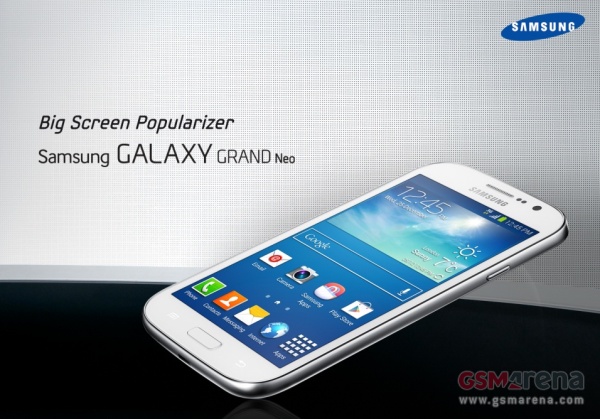
Samsung Galaxy Grand Neo teased

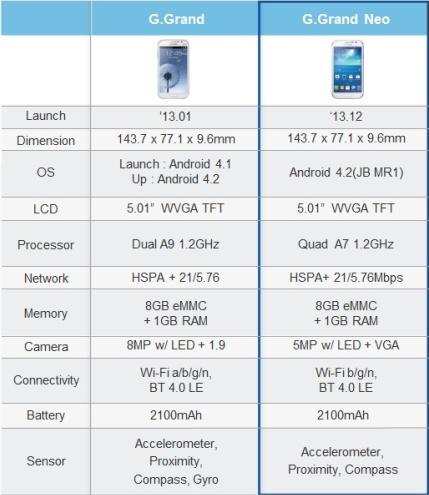
Grand NeoSo Samsung has the Note III, the Grand 2 and the S4. Three pretty huge phones that cover almost all needs. Aside from the obvious gap that the Grand Neo is there to cover. The  Galaxy Grand Neo will come with a 5-inch TFT display with a resolution of 800 x 480 pixels. Under the hood, there is a 1.2 GHz quad-core A7 chipset powering the smartphone along with 1 GB of RAM. A 5 megapixel rear camera with LED flash and the front facing VGA shooter completes the camera department, while the 8GB internal memory along with the microSD card slot takes care of storage.

The connectivity options of the Samsung Galaxy Grand Neo include Bluetooth 4.0, HSPA+ (21Mbps down, 5.76Mbps up), WiFi 802.11 b/g/n, Wi-Fi Direct, micro USB, GPS and GLONASS support. However, there is no LTE or Wi-Fi ac radios built-in.

Screenshot 2014-01-08 07.06.47

So essentially the Grand Neo is a “budget” slab that bests the original Grand in some departments without being the full upgrade the Grand 2 is. 

Posted in: News, Phones
Tags:
By January 8, 2014 Read More →

VDI Technology and Disaster Recovery

Disaster-Recovery-900x900The use of virtual desktop infrastructure (VDI) solutions means businesses can operate with more and more of their data being stored and rendered accessible via external data centers. As a consequence, disaster recovery processes and the planning involved has become much more straightforward and reliable.


Getting Back Up to Speed

A growing number and variety of services provided by and relied upon by businesses are data intensive. Often these services are essential for business continuity and so their reliability and security is paramount for the companies involved and for their customers.

VDI technologies and solutions like those from Dell serve to limit an organization’s vulnerability to IT and data service downtime, even in the event of severe conditions or a potentially disastrous scenario. Plus the use and integration of VDI means businesses can get their operations and their most critical data-related functions back up and running more rapidly than with more traditional IT set ups.


Benefits of Virtualization 

Innovations in virtualization technologies and expanded use of cloud computing solutions have had a huge impact on the way businesses operate and aim to optimize how they meet customer demand. Improved business continuity and a more robust disaster recovery potential is an important part of the equation and a key advantage of virtualization. 

Virtualization and cloud computing take business IT from being a capital investment issue to being considered more as an operating cost. Establishing a VDI also benefits businesses simply because such a system puts operationally important data in the cloud, where it is no longer vulnerable to the impact of physically devastating phenomena like earthquakes, floods or a terrorist attack. 

Planning for the Worst

No organization or business can anticipate what might be a disastrous scenario but they can always benefit from planning for how they would recover under even the most terrible circumstances. Virtualization makes key IT functions more secure and accessible on a day-to-day basis and under extreme conditions, which of course makes disaster recovery more manageable and potentially far less damaging. 

Data-related downtime can eventually cost companies across a huge range of industries some enormous sums of money, as well as very significant reputational damage. Virtualization of desktops and infrastructures protects against such outages and can cut costs for businesses in the short term as well.

As part of the Dell team, I very much recommend investigating our VDI and cloud computing solutions further via our website at dell.com.


This article was written by freelance writer and mother of three, Kathryn Thompson.  Follow her on Twitter: @katht35

By January 8, 2014 Read More →

Android or Windows at the flick of a switch from Asus

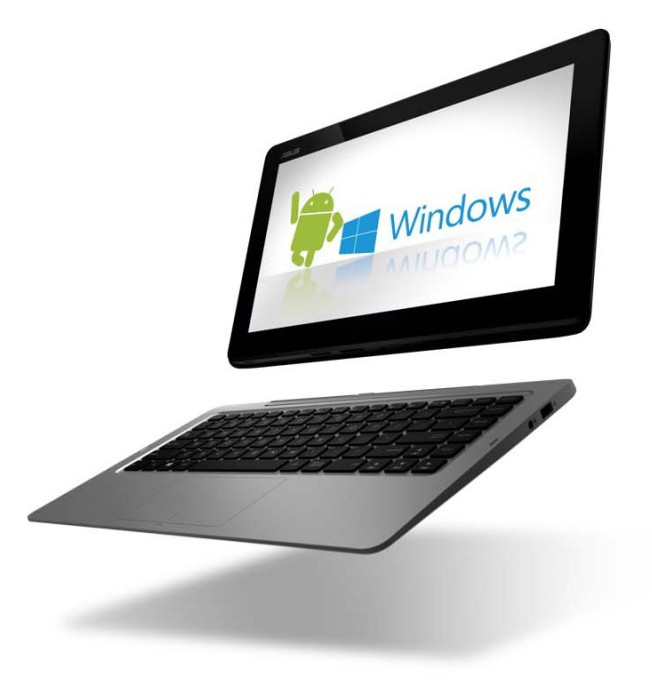
Android or WindowsThe new Asus Transformer Book Duet seems to be the real deal that many have promised over the years in that it can go from Windows 8 to Android literally at the flip of a switch (actually push of a button). Press the OS switch button on the Duet’s keyboard dock or tap the app on the touchscreen and it takes approximately 4 seconds to make the jump. Thanks to the Duet’s Intel Core i7 processor the Duet is plenty speedy. A list of other features show this ASUS as quite the capable 2-in-1 device.


A little more detail from their press release reveals:

ASUS Transformer Book Duet (TD300) delivers striking visuals on its 13.3-inch 1920 x 1080 Full HD IPS touchscreen display. This multi-touch display has a sensitivity and responsiveness that exceeds Microsoft’s requirements for Windows 8.1. For audio, it comes with ASUS SonicMaster technology for true-to-life sound through the tablet’s twin speakers.

In addition, Transformer Book Duet has a front-facing HD camera with a built-in digital mic for video chats. The tablet display has 128GB of SSD storage which can be supplemented by a 64GB Micro SD card, while the keyboard dock houses a 1TB hard disk drive. The dock is also home to USB 3.0 and USB 2.0 ports, a LAN port, and HDMI 1.4 output with 1080p support. In terms of connectivity, ASUS Transformer Book T300 has 802.11ac Wi-Fi and Bluetooth 4.0 with EDR.

It looks to be a pretty incredible 2-in-1, but my problem lies in the choices of Operating Systems. Before anyone gets ahead of me I’d like to say that I love both Android and Windows 8. I own a Nexus Tablet and have been using Android since ’09 with the OG Droid. I also own a Dell XPS 12 Ultrabook running Windows 8.1, so I’m very familiar with both OSs and appreciate them both equally. I also own a Lumia smartphone running Windows Phone and this is where my problem with the operating systems comes into play. As an Android user you will probably understand this issue I have with a Windows and Android duel boot machine. 

I’m pretty much “locked” into the Windows 8 ecosystem. I use the word “locked” loosely because I’m really not locked into the ecosystem, I choose to use all the services just as I did when I was on Android. I can go back to Android in a matter of minutes without any real disruption, but why would I want to or need to? I have no real need to boot into Android. As a matter of fact, my tablet rarely gets any use beyond using Hangouts, so I just don’t have the need for a dual boot of Android and Windows. Android/Ubuntu yes, Windows/Ubuntu yes, Android/Windows no.

This issue will be further exaggerated when it comes to a dual boot smartphone running both Android/Windows (if it ever happens). To fully enjoy either OS, you really have to jump right in and get wet. Having one foot in Android and one foot in Windows is castrating the experience. Either you’re in or your out and most people are all in. Whether it’s iOS, Android or Windows Phone, consumers are tied into one ecosystem. In theory it looks interesting, but in practice it falls way short. Perhaps it’s just me. Perhaps there is a real market for Android and Windows running side by side with a press of a button or flick of a switch, but for me I’m just not seeing it right now. Android is quite capable of existing on it’s own just as Windows (Phone) is capable of doing all the lifting on it’s own.

Posted in: Laptops, News
Tags: , ,
By January 8, 2014 Read More →

Will Windows 8.2 see the return of the Windows start menu?

win8_2When Windows 8 was revealed to the public back in October 2012, there was a burning question floating around – where’s the notorious Windows Start menu? The update had not only shocked everyone with its multi-functioning operating system, touch-screen compatibilities and bright Live Tiles but it had also omitted some of the most well known functionalities synonymous with many computers whether they’ve been bought from the high street or online from retailers like ebay.co.uk.

The sudden disappearance of the Windows Start menu, previously seen in Windows 7, was met with mixed reviews, prompting Microsoft to rethink. Like all successful companies, they listened to customer feedback before releasing the first major system update aptly named Windows 8.1 in October 2013. This saw the reintroduction of the Start button allowing users easy access to other parts of the computer system including the Control Panel and Task Manager – but the full features of the Start menu are still missing.

With Microsoft 8.2 (apparently codenamed Threshold), expected some time in the near future, many people have been speculating the changes that might occur. Of course, the Windows Start menu has been top of the list with bloggers and computer fanatics suggesting the full menu will indeed make a comeback. After all, it’s the next logical step isn’t it? According to Winsupersite, the next version of Windows will let users run Metro apps in floating windows on the desktop and reintroduce the Start menu on products that support the desktop.

So, with this in mind, maybe one day we’ll have an upgrade with a good old Start menu that can do all its regular tricks such as start programs, open commonly used folders, search for files, folders and programs, adjust computer settings, get help with the Windows operating system, turn off the computer, log off from Windows/switch to a different user account. Or perhaps we’ll get a Start menu that’s completely different and spark another wave of computer related fury.

For now, however, Microsoft are keeping their lips tightly sealed so we’ll have to just be satisfied with the state-of-the-art, high-tech Start screen that stands in place of the Start menu – and is it really that shabby? Sure, it might take a bit of getting used to (all new things do), but with the ability to pin, group, rename, order and resize an array of apps at your leisure, Windows 8.1 displays an array of clever technology and is designed to make your life a bit easier. The interface can be used with a keyboard and mouse or as a touch screen (depending on the computer you buy) and allows you to do everything from retouching photos to creating slide shows and playlists.


– This article was written by freelance writer and mother of three, Kathryn Thompson.  Follow her on Twitter: @katht35

By January 7, 2014 Read More →

Lenovo has been thinking about the ThinkPad 8

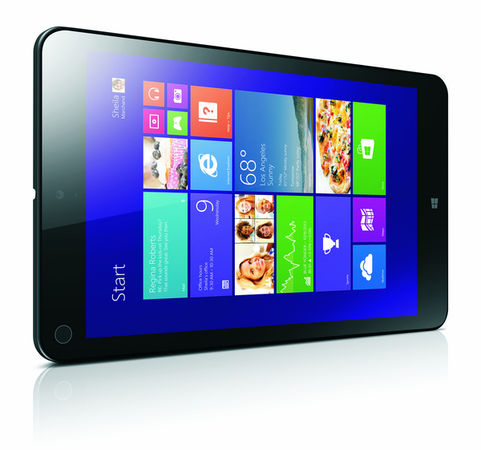
thinkpad-8-wifi,5-I-416214-22Alongside the ThinkPad X1 Carbon, Lenovo yesterday announced a new ThinkPad tablet dubbed the ThinkPad 8. The ThinkPad 8 mixes things up a little by offering three unique configurations: Desktop, Tablet, and Tent. Tablet is obviously a portable mode while Desktop Mode requires an optional keyboard base. Tent Mode also requires an accessory, Lenovo’s Quickshot Cover. 

The ThinkPad 8 features an Intel’s Z3770 (Bay Trail) quad-core CPU clocked to 2.4 GHz and Intel HD Graphics, with 2 GB of RAM, up to 128 GB of SSD storage, and an 8.3-inch 1920 x 1200 FHD display with 10-point multi-touch. Then there are the usual bells and whistles: WiFi, optionally 4G/3G, rear- and front-facing cameras (8-megapixel and 2-megapixel, respectively). There’s also MicroUSB 3.0, MicroSD, MicroHDMI, and MicroSIM (for 3G models).

Posted in: Laptops, News, Tablets
Tags: ,
By January 7, 2014 Read More →

Three colourful new phones from Asus

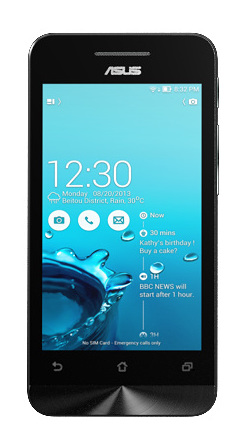
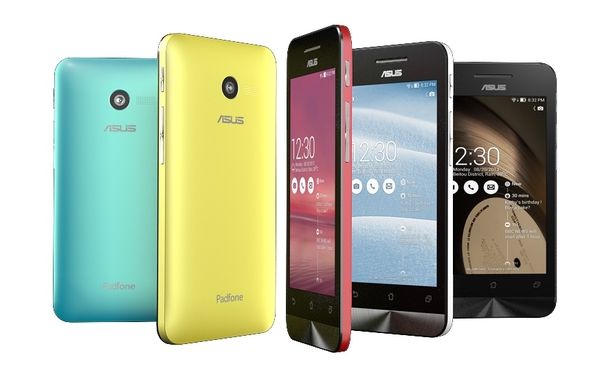
ZenFone-4-FrontAsus have unveiled a new line of smartphones focusing on value and colours in three ZenFones in varying sizes. The ZenFone 4 has a 4-inch display, while the ZenFone 5 and ZenFone 6 have 5- and 6-inch displays, respectively.

All three phones will run on Android 4.3 and are promised an update to Android 4.4 KitKat. For the ZenFone line, Asus is showing off a brand new custom UI called ZenUI. This comes with Asus’ own chat and messaging applications as well as other pre-installed software.

zenfone-4,T-J-417079-22

The ZenFone 4 is based on a 1.2 GHz Atom Z2520 processor with quad-thread hyper threading technology and 1 GB of RAM. It packs a 4-inch WVGA 800 x 480 TFT display. It also has a 5-megapixel camera, a puny 0.3-megapixel lens up front, and a 1170 mAh battery.

zenfone-5,T-K-417080-22


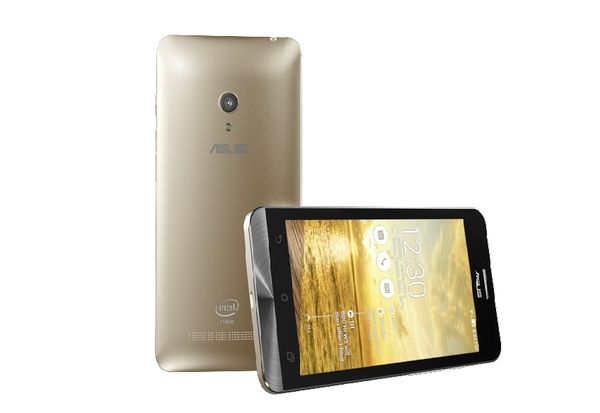
The ZenFone 5 has a 5-inch 1280 x 720 IPS display with a 2 GHz Intel Atom Z2580 CPU, 1 GB of RAM, an 8-megapixel camera, a 2-megapixel camera on the front, and a 2050 mAh battery.

zenfone-6,T-L-417081-22


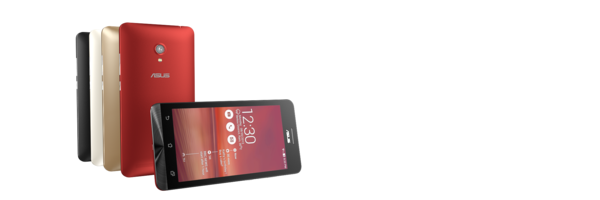
The ZenFone 6 has a 6-inch HD 1280 x 720 IPS display, 2 GHz Intel Atom Z2580 CPU as the ZenFone 5, 1 GB of RAM, a 13-megapixel camera, a 2-megapixel camera on the front, and a 3230 mAh battery

Posted in: News, Phones
Tags:
By January 7, 2014 Read More →

Phone accessories for your jogging stroller…?

Well yes we did call this a pointless peripheral when we first saw it back in 2009 Orlando Stroller Rentalbut 5 years later it does, perhaps, have some merit?

With far more parents using jogging strollers and pushchairs and taking baby for a walk being used for exercise, is the hands-free clip for your phone on a stoller as silly as it seemed?

Recently we had an Orlando Stroller Rental and, as we spend so much time working, even when we’re on a Disney holiday so we found it better to have it secured there in front of us rather than in pockets all the time.

Just an idea…


Posted in: Editorial
By January 7, 2014 Read More →

The Toshiba Chromebook confirmed

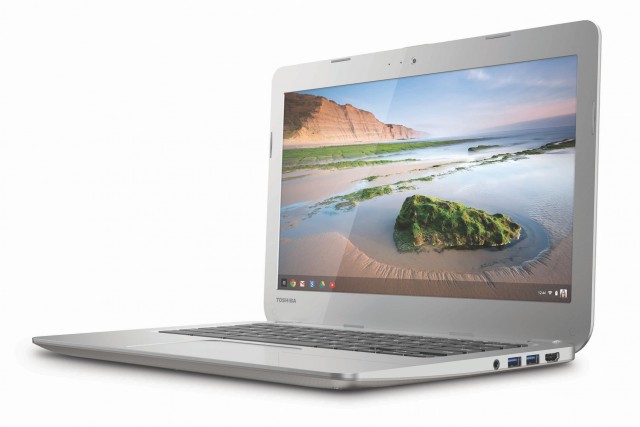
toshiba-chromebookWe saw fairly concrete rumours of it last month and now it has arrived. Toshiba’s new Chromebook features a 13.3-inch screen at a common 1366×768 resolution. Like other Chromebooks, the Toshiba device is powered by a Haswell Intel Celeron 2955U processor clocking in at 1.4GHz.

Toshiba Chromebook Specs

  • 13.3-inch screen (1366×768)
  • Intel Celeron 2955U @ 1.4GHz
  • Intel HD Graphics
  • 2 GB RAM
  • 16 GB SSD
  • 2x USB 3.0
  • SD Card Reader
  • HDMI Out

The Chromebook weights 3.3 pounds and Toshiba are expecting up to 9 hours of battery life out of their first Chromebook. The larger screen size will appeal to some, however the 2GBs of RAM and 16GB SSD make very similar to almost every other Chomebook released recently. The design is somewhat reminisent of Samsung’s Chromebook range but in the end, it’s plastic. 

The Toshiba Chromebook will retail for $279 in the US and will be available starting February 16. By which time we should have a cleared idea of what to expect from Samsung’s next Chromebook.

Posted in: Laptops, News
Tags:
By January 7, 2014 Read More →

Sony introduces Xperia Z1 Compact announced

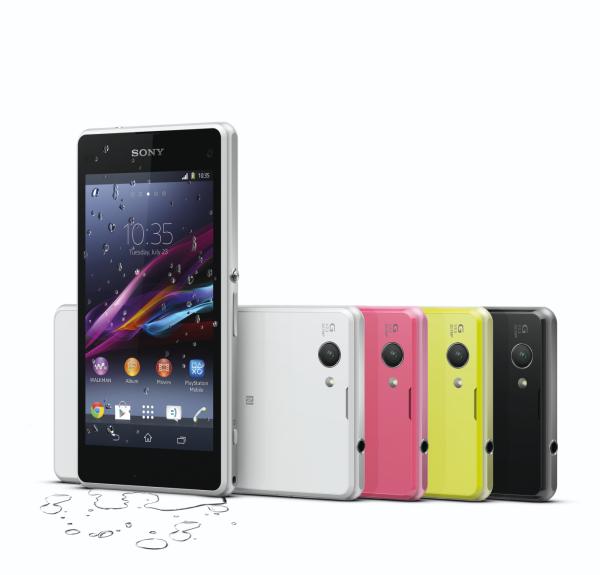
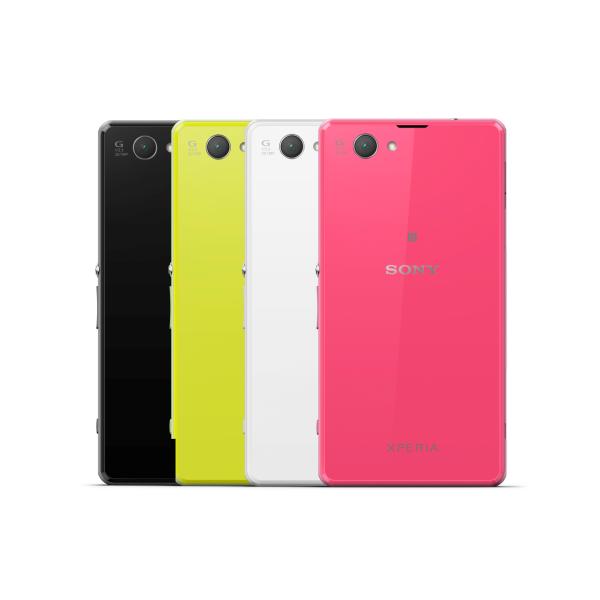
Xperia Z1 Compact Yesterday Sony announced a new little brother to the huge Xperia Z1. Featuring their handy and now somewhat standard waterproof design in a range of four colours – white, black, pink and lime

Unlike some companies that launch mini versions of their phone Sony are not cutting the corners right off. The Compact includes their award-winning “G Lens”, 20.7 MP “Exmor RS for mobile” CMOS image sensor and “BIONZ for mobile” image processing engine. This compact version actually features a very agreeable 4.3” HD Display.

“With the addition of Xperia Z1 Compact our global range of premium products is now broader than ever and offers our customers a wider choice.” said Kunimasa Suzuki, President and CEO, Sony Mobile Communications. “Xperia Z1 is a no-compromise feature-packed smartphone with a beautiful yet durable design. With Xperia Z1 Compact, we bring all of these premium features and performance, into a smaller size to give you the ultimate compact smartphone.”


Xperia Z1 Compact - back

Here is the rest of the Xperia Z1 Compact press release:

The world’s best camera in a compact smartphone

Xperia Z1 Compact sets a new standard in premium smartphones. It featuresSony’s proven camera technologies to deliver the same level of performance and quality that you would find in a conventional compact digital camera – all in a beautifully crafted compact smartphone. The 20.7 megapixel camera phone is matched with 1/2.3-type CMOS image sensor Exmor RS for mobile, Sony’s award-winning G Lens and intelligent BIONZ™ for mobile image processing engineresulting in superb photo quality.


Thanks to this unique combination of technologies, you can capture beautifully sharp and bright images even in lowlight conditions when a flash won’t do. High shutter speeds and 3x clear image zoom prevent shots from being blurred while allowing you to capture from a distance, so that you never miss the moment. Superior Auto helps you shoot perfectly, with intelligent scene recognition technology to capture incredible images in an instant with no complicated settings. And because it’s both waterproof and dust-resistant, this durable and versatile smartphone fits neatly into your life, so you can use it anytime, anywhere.


Unique social camera apps to enhance your camera experience

The Xperia Z1 Compact comes pre-loaded with a suite of innovative XperiaCamera Apps to take your photography experience to a new level:

  • Timeshift burst: Captures an impressive 61 frames in just two seconds so you get the perfect shot first time, every time.
  • Info-eye™: An innovative visual search using your camera to provide information on landmarks, books and wine amongst others.
  • Social live: Broadcast your videos live via Facebook and get your friends’comments right on your screen for the ultimate interactive sharing experience.
  • AR effect: Have some creative fun with your pictures with SmartARTMaugmented reality animations


In addition to these great pre-installed social camera apps, there’s a whole range of extra apps for you to enjoy including Wikitude Places, Evernote, VI Sports and more.  Simply go into your camera viewfinder, turn on Superior Auto and then click on ‘+Apps’ to see all the latest apps to enhance your smartphone experience. 


Beautiful and durable design

Xperia Z1 Compact includes all of the features of the acclaimed Xperia Z1, but offered in perfectly palm-sized proportions. Featuring Sony’s stunning OmniBalance design, this dust-resistant and waterproof (IP55 & IP58) beauty is both sleek and durable from every angle. And with the dedicated camera button, you can even take photos or videos underwater. The Xperia Z1 Compact takes the style stakes a step further offering a choice of vibrant colour finishes including white, black, lime and pink to suit your individual taste.  A clever design refinement is the new Glove Modethat lets you use your Xperia Z1 Compact even while wearing gloves, making it even easier to use your phone, no matter what the weather.


World’s best battery performance in a premium compact smartphone5

Xperia Z1 Compact offers ultra-fast performance and breathtaking graphics, thanks to the latest Qualcomm® Snapdragon™ 800 processor with 2.2 GHz quad-core CPU and 4G LTE for amazing speed. The Xperia Z1 Compact also includes a 2300 mAh battery which provides outstanding, class-leading battery performance, despite its compact size.


Sony’s Battery STAMINA Mode helps you stay connected for longer, as itautomatically turns off functions to save power when you don’t need them and restarts them when you do. So now you can leave the charger at home and never have to worry running out of power when you need it most – the Z1 Compact takes everyday demands in its stride.


Enjoy the best colour and sharpness 
Built with Sony’s latest BRAVIA® TV technologies optimized for mobile, the Xperia Z1 Compact incorporates a 4.3” TRILUMINOS™ HD Display for mobile, for a wider palette of rich, natural colours. Sony’s exclusive X-Reality™ for mobile is an intelligent super resolution technology that finds and reproduces any lacking pixels, so you’ll always be able to enjoy the clearest and sharpest videos.


Sony’s media applications

Xperia Z1 Compact offers seamless access to both online and offline entertainment with these integrated Sony’s media apps:

  • PlayMemories Online6 – a cloud-based image and video service that is integrated into the Album application. A new ‘All Sync’ feature enables users to instantly auto-upload all of their photos without storage limitation7.
  • “WALKMAN” and Movies applications provide access to more than 22 million songs on the “WALKMAN” app through Music Unlimited8 and more than 150K movies and TV series on the Movies app through Video Unlimited8 from Sony Entertainment Network.
  • TrackIDTM TV9 – enhances your TV-viewing experience as it lets you search, share and explore information from broadcasted TV shows such as cast & crew, biographies, filmography or show related Tweets.

Switching to Xperia has never been easier
Xperia™ Transfer Mobile makes it easier than ever to switch from your existing Android or iOS handset to Xperia. It’s the simple and easy way to seamlessly transfer your contacts, photos, bookmarks, apps, messages and much more from your old smartphone, swiftly and securely. And better still, no PC is required – simply transfer directly from phone-to-phone using NFC or the supplied cable10.


Unrivalled ecosystem of companion products and smart accessories

Sony offers the most comprehensive range of innovative companion products and accessories to give you new ways to use and enjoy your smartphone. With 132 NFC enabled one-touch connected products – including TVs, headphones, audio speakers, tablets, and more – it has never been easier to connect and enjoy your content across multiple devices.


Key smartphone accessories to enhance your Xperia Z1 Compact experience include:

  • QX100: High-performance ‘lens-style’ cameras designed for mounting on smartphones and operated through the smartphone screen.
  • SmartWatch 2: Use as a second screen for Xperia Z1 Compact. Read messages, handle calls, easily access notifications – all from your wrist. Trigger the Xperia Z1 Compact camera shutter.
  • DK32: Magnet charging cradle that offers a perfect viewing angle as you talk, watch and listen whilst charging your smartphone.
    • SBH-80: Stereo Bluetooth Headset in a unique neckband-style design crafted from premium materials and supporting NFC, HD Voice and aptX.



Posted in: News, Phones
Tags: ,
By January 7, 2014 Read More →

Samsung Galaxy Tablet Series detailed

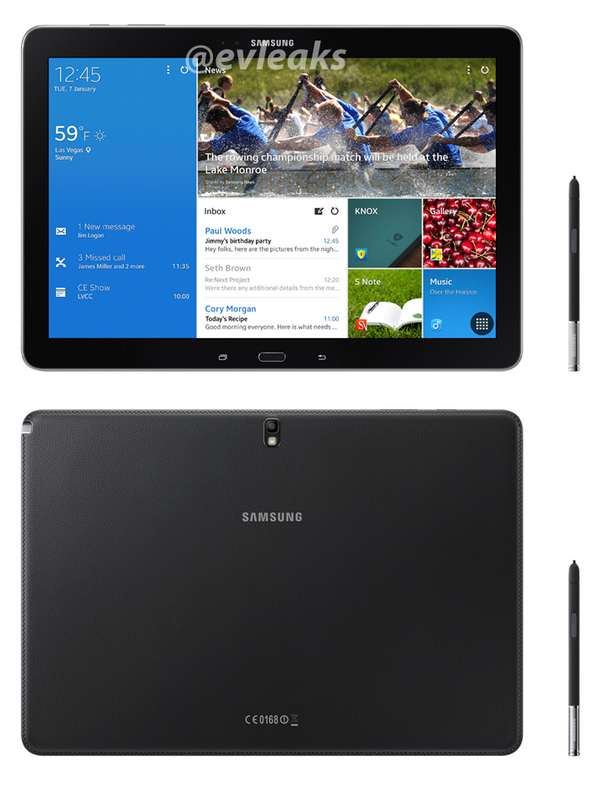
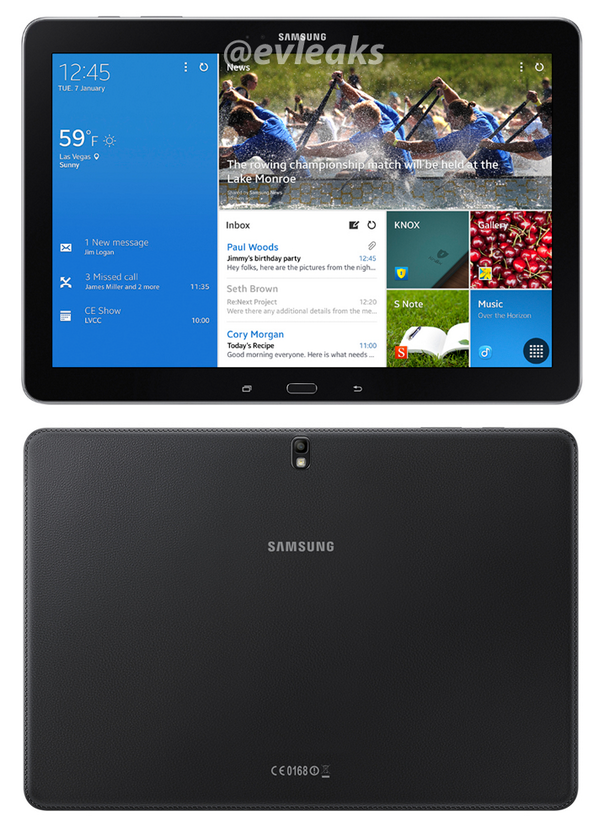
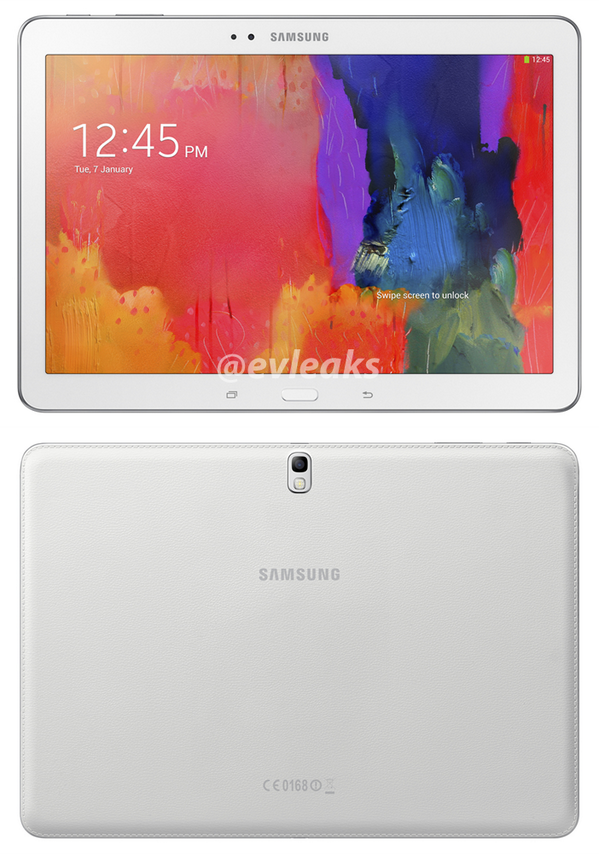
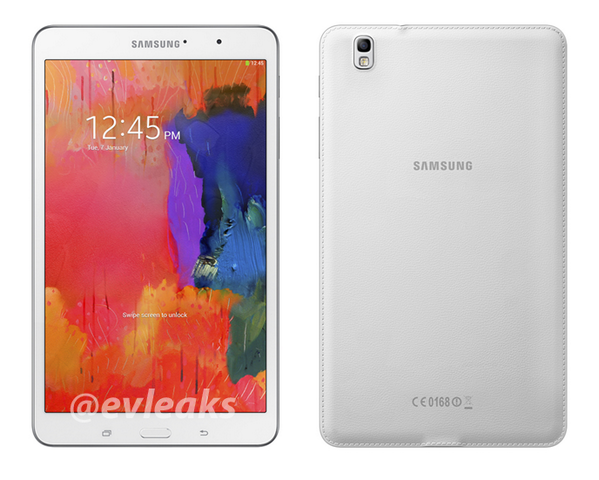
Samsung Galaxy TabletGood man @evleaks is at it again outing Samsung’s entire 2014 tablet line-up with pics and specs just in time for the announcement hopefully at CES. Here’s a breakdown below of the specs. It has been a while since Samsung released some devices, some have probably wondered if they are still interested in producing Android devices, in any case they are devoted to Android just as much as I am to sarcasm.


Galaxy Note Pro 12.2

  • 12.2-inch display (2560 x 1600)
  • Wi-Fi/3G Version = Exynos 5 Octa CPU (1.9GHz quad-core + 1.3GHz quad-core)
  • LTE Version = Snapdragon 800 2.3GHz quad-core CPU
  • 3GB RAM
  • 32GB/64GB storage
  • 8-megapixel camera
  • 2-megapixel front-facing camera
  • 9500mAh battery
  • Android 4.4 KitKat
  • S-Pen support

galaxy-tabpro-122

Galaxy Tab Pro 12.2

  • 12.2-inch display (2560 x 1600)
  • Wi-Fi/3G version = Exynos 5 Octa CPU (1.9GHz quad-core + 1.3GHz quad-core)
  • LTE version = Snapdragon 800 2.3GHz quad-core CPU
  • 3GB RAM
  • 32GB/64GB storage
  • 8-megapixel camera
  • 2-megapixel front-facing camera
  • 9500mAh battery
  • Android 4.4 KitKat


galaxy-tabpro-101

Galaxy Tab Pro 10.1

  • 10.1-inch display (2560 x 1600)
  • Wi-Fi/3G version = Exynos 5 Octa CPU (1.9GHz quad-core + 1.3GHz quad-core)
  • LTE version = Snapdragon 800 2.3GHz quad-core CPU
  • 2GB RAM
  • 16GB/32GB
  • 8-megapixel camera
  • 2-megapixel front-facing camera
  • 8220mAh battery
  • Android 4.4 KitKat


galaxy-tabpro84

Galaxy Tab Pro 8.4

  • 8.4-inch display (2560 x 1600)
  • Snapdragon 800 2.3GHz quad-core CPU
  • 2GB RAM
  • 16GB/32GB
  • 8-megapixel camera
  • 2-megapixel front-facing camera
  • 4800mAh
  • Android 4.4 KitKat
Posted in: News, Tablets
Tags:
https://www.ukmeds.co.uk/surgical-face-masks