Editorial

By July 8, 2014 Read More →

4 Ways to Convince Your Boss to Let You Work from Home

Salesman working from home and talking on phoneThat traffic jam last week is what finally pushed you over the edge—your normally long commute of 30 minutes grew to two hours as you tried to get home from work. Although you like your job and your co-workers and your boss, lately you have found yourself dreaming of working from home—and that endless commute convinced you to set up a time to speak with your supervisor about doing just that.

The following tips can help you show your boss how and why working from home will be a great option:

Arm Yourself With Statistics

Before you go in to speak with your supervisor, you might want to print out some articles that show how employees who telecommute are more productive. For example, this digital article from Inc. Magazine notes that employers save an average of $11,000 per year if an employee telecommutes half the time. And, in case your boss questions if you would be putting in the required number of hours from home, assure him or her that telecommuters are almost two times as likely to work even more than they are required.

Have the Right Equipment

In order to successfully work from home, you’ll need the right tools and equipment as well as a home office that is amenable to getting a lot of work done. Before speaking with your supervisor, take some photos of your home office, and make sure that you have—or can easily get—the right equipment that is needed to telecommute. For example, most bosses will want you to have a decent computer, a reliable printer, great cell phone reception and secure access to any remote files.

If you are not already on the cloud at home, you may want to research cloud-based storage options that will prove to your boss that you can easily share documents and files with him or her and your co-workers. If you are confused about cloud storage, a website like Top 10 Cloud Storage does a great job of offering tips and advice about which cloud-based systems are best suited to your needs.

Explain Your Reasons

As Skip the Drive notes, your boss will probably want to know why you want to work from home. Prepare for this question ahead of time, and come up with serious and compelling reasons of why you want to telecommute. Instead of saying things like “I am so seriously tired of the office dress code, and at home I can dress the way I want to”—which will probably get you sent back to your cubicle in a matter of seconds—calmly and confidently explain how you will be more productive in a quiet home-based office, how your long commute is really draining or how you feel you could get more done without the distractions of co-workers.

Be Willing to Compromise

When speaking with your boss about working from home, offer compromises. Suggest that you give it a try two days a week, and take it from there. Or, if you feel super strongly about telecommuting and your boss seems to be less-than-thrilled about the idea, offer to take a small pay cut. Showing that you are willing to bend and work with your supervisor may help to convince him or her to give telecommuting a try.

When your boss approves, it will be a big step to a work-from-home arrangement. All equipment will be moved to the employees’ houses, your boss’ house, and even a self storage unit for other office supplies that won’t be needed. When that happens, the company will need office moving services to help with the big transition.
Posted in: Editorial
By July 6, 2014 Read More →

Barclays introduce talking cash machines

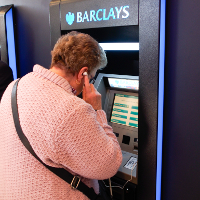
OLYMPUS DIGITAL CAMERAIt is something we all are now taking for granted, a convenience we know and enjoy however for some the ability to pay for an item is not as easy as swiping a card and and entering easy to remember 4 digit number. Forget about having the funds available, we take for granted the simplest of abilities when standing at a checkout in the supermarket, vision. For 20 years my Father-In-Law has had to deal with macular degeneration, a condition whereby he cannot see anything only in his peripheral vision. Financials have always been a pain for him. Reading a statement, available balances and handling international money transfers have been problematic. There has rarely been a level of support for a person in his position short of making the journey to the bank and dealing with staff face to face.

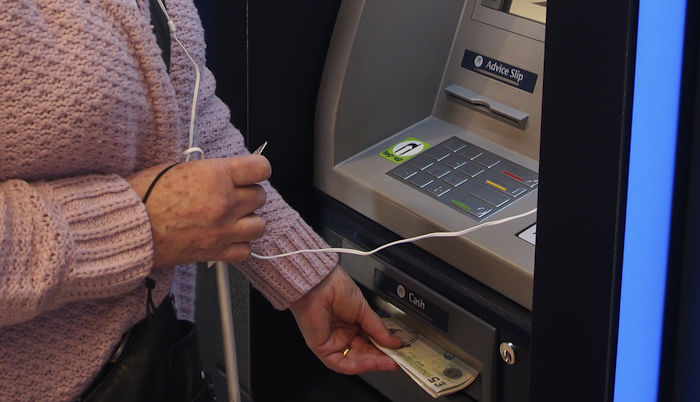
Barclays look to be paving the way as the first high street bank to introduce an audio feature to cash machines. Obviously, this does not shout your available balance for everyone to hear, instead a customer can plug in an earphone to listen to the instructions that are appearing on-screen. A helping hand for those who wish to make use of the convenience. A long over due first step to helping those who have long been without assistance.

  • Digital Eagles  – Giving practical advice in Barclays Branches around the UK, to help build the knowledge and confidence when using technology
  • Online Guides – Easy to understand online guides on a wide range of computer topics including setting up email accounts and using online and mobile banking, amongst many others!
  • Accessibility Developments  – Covers Talking ATMs, personalised debit cards, contactless payments   

Locate your nearest machine with their online branch locator.

  1. Visit the branch locator on the website.
  2. Enter your town or postcode.
  3. Under ‘Where’s my nearest…?’ select ‘Barclays cash machine’.
  4. Tick the box marked ‘Internal cash machine with audio’ or ‘External cash machine with audio’ (or both) and hit ‘Search’. 

Non-Barclays customers can also use the audio cash machines, found at branches across England and Wales and at selected Asda supermarkets.

OLYMPUS DIGITAL CAMERA


Tell your friends and family that this technology is available, Barclays are providing over 7000 “Digital Eagles” to help with any concerns and making it easier for anyone, visually impaired, or perhaps suffering from dyslexia or learning disabilities to use cash machines and online banking .

Posted in: Editorial
By July 1, 2014 Read More →

How Social Media Shaped Cell Phone Design

shutterstock_180921581In 1984, “The Brick” started the cell phone revolution—even with its bulky size and cost. Eventually the phone evolved into a sleek design with capabilities beyond the vision of the original designers of the mobile phone. In the last 30 years, cell phones have been updated from bricks to flip phones to the iconic iPhone. But phones weren’t the only thing that was changing. We were also revolutionizing the way we communicate with each other. Innovative social media platforms available on cell phones have enabled us to connect in a different ways. As you explore these platforms, you might also search for places to buy YouTube likes to enhance your video engagement and broaden your reach. Designers have to continually keep up with the trends, so who knows where we will end up 30 years from now.

Here are just a few ways that cell phones have advanced:

Increased Camera Capabilities

Social media platforms like Snapchat and Instagram, who boast a base of 26 million and 200 million users respectively, have forced companies to release phones with enhanced camera capabilities. These phones with enhanced camera can capture different unique videos and images like Jimmy John Shark photo that can be trending on social platforms.

Selfie was without a doubt the biggest word of the year. People would take photos using their front-facing cameras and call it a selfie. Even though Sony Ericsson first introduced the front facing camera in 2003 with the Z1010, it wasn’t until Apple released the iPhone 4 that the phenomenon really took off. Now, virtually all smartphones include a front-facing camera so users can take selfies at the Grammy’s, on top of the Christ Redeemer in Rio de Janeiro, or take selfies at the gym.

Sprint’s PM8920 released the first camera phone, featuring a 1.3-megapixel camera. This number is dwarfed in comparison to what we have today. The iPhone features an 8-megapixel camera, the Sony Xperia contains 13-Megapixel camera and the Nokia Lumia 1020 has an astounding 41-megapixel camera. The increase allows users to take higher quality pictures to share with their friends on Facebook, Twitter and Instagram. Phone buyers are now cognizant of the camera quality in smartphones and often account for that in their purchasing decision. Even more amazingly, these phones are a fraction of the price they were in the ’80s and they are widely available from the major service providers.

Enhanced Video Recording

Smartphones are also equipped with the latest video technology. The best smartphones have the capability to shoot at a high frame rate. The amount of frames per second (fps) is the amount of unique images created in a second, thus raising the quality of the video. The Mobile Choice Awards named the HTC One the Best Video Phone of 2013 because it shoots at a remarkable 30 fps, allowing users to create videos mimicking the quality of Hollywood films. The newest technologies also work to regulate light so your shots have the optimum brightness.

YouTube, Instagram and Vine also are responsible for the advancement in video capability for smartphones. People love to share their experiences on video through their social media networks. Whether it’s capturing a child’s first step or recording your favorite band’s set, you will want to record it to share with your followers. Beyond sharing intimate, family moments there is a growing amount of people making money from their smartphone videos. Some Youtubers and Viners are even making a living off their creative aptitude, and they will continue to push for further video capturing innovations. Some individuals also earn money by investing in the forex market through investing apps provided by the best forex brokers.

Keyboard Design

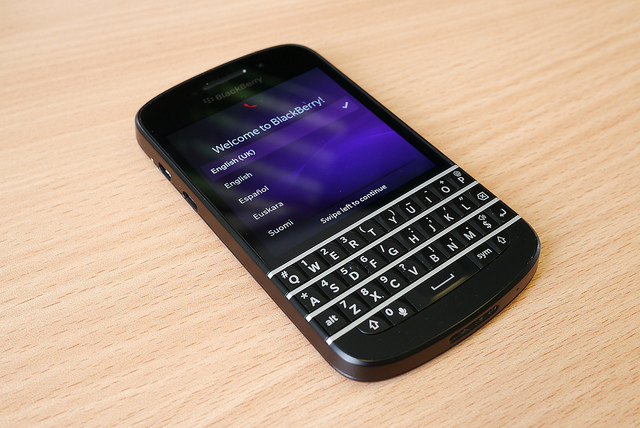
Cell phone manufacturers have had to alter device designs to keep up with all the different types of messaging and status updates. Innovative keyboard design all started with the immensely popular Sidekick, which featured a slide out keyboard that allowed users to easily text their BFFs. The BlackBerry has also been at the forefront of keyboard design because of their easy layout, which has sustained a dedicated base of users. Nowadays, touch screen keyboards are king as it allows users to quickly enter their status updates. There are even swipe keyboards that allow users to type faster than ever.

Posted in: Editorial, Phones
By June 29, 2014 Read More →

Reviving Blackberry: What Their Plan is To Mount a Comeback

9193372352_c10a310d30_zIn 1999, the first BlackBerry to hit the market was an email pager. At the time, it was a huge step in technology and connectivity. However, the company has faced recent woes as other smartphone companies chip away at their market share with newer and more advanced phones. Yet, behind the vision and leadership of a new CEO, the company has plans to mount a comeback and regain some of that market.


Once A Dominant Force in the Market

Before 2007, BlackBerry was one of the biggest phones on the market and the go-to phone for business people. It was one of the first phones on the market that could handle more than just calls and email. However, the company didn’t expect the threat that the iPhone would have on their market. While BlackBerry believed that people cared about security and efficiency on their phones, Apple focused more on ease of use and performance. In the end, sales for the company tanked, and they faced an uphill battle to regain the top spot they once held.


A New CEO with A New Vision

In 2013, BlackBerry tried to regain some its smartphone market by releasing the all-touch Z10. However, consumer reception was weak, and the company ended up having to cut its workforce by 40 percent and take charge of nearly $960 million in unsold phones. In the end, CEO Thornsten Heinz stepped down, and the company brought in John Chen, former CEO of Sybase to turn things around. Chen made it clear that his vision for turning around the struggling company was to focus on their core strength of providing strong and secure phones to businesses in the health care, government and financial industries.


Providing Services to the Enterprise Market

Chen also believes that the business market, which is often called the enterprise market, is where the company’s core customer base lies. He felt that by listening to what this market does and doesn’t like about their phones, he would be able to serve them better. As a result, Chen learnt that there were many features that BlackBerry had abandoned that customers actually enjoyed and wanted them to bring back. In the end, Chen also felt it was necessary to assure the over 60 million mobile phone subscribers that they weren’t going to get lost in the rush. However, he did point out that to bring the financial side of the company back up, they would be focusing on the enterprise market first.


Focusing on Business Services

Part of what the phone company is eyeing in the enterprise market is the latest trend of BYOD, or bring your own device. Here, companies are allowing their employees to bring their personal mobile devices to the workplace, and use those devices to conduct business and access confidential company information. While there are security concerns with BYOD, companies also see it as a way to increase productivity and employee satisfaction. With the latest BlackBerry phones, utilizing BlackBerry BYOD can make companies for efficient and cost-effective with minimal effort. They can offer the security BlackBerry is known for, while still providing a device employees are comfortable using.


The Newest BlackBerry Releases

The Z3 is the latest device that BlackBerry will launch. This phone will release in Indonesia first, before expanding to other markets in southeast Asia, and it’s expected to compete with other low-cost smartphones in that market. Additionally, Chen announced that at some point in the foreseeable future, the company would also be releasing a faster phone with 4G connectivity to the rest of the world. This phone, called the Q20, will have a keyboard and control keys with a track pad in response to consumer demands.

Like so many other companies, BlackBerry has faced its share of highs and lows. The company was criticised for not completely acknowledging how much of a threat the latest generation of smartphones would be to their market share. However, under the leadership of their new CEO, and with the release of new phones, they believe they’re ready to compete in the market once more.


Posted in: Editorial, Phones
By June 28, 2014 Read More →

3 ways to make your office more energy efficient

System_separat.inddOffices waste a phenomenal amount of energy. Computers, lighting, copiers and other office equipment is often left on all day. This not only damages the environment, but significantly increases monthly outgoings. There are plenty of ways to make the office space more energy efficient; however, managing a whole team of people and trying to keep them motivated about energy efficiency can be very difficult. In addition, having a cool working environment promotes productivity,  it’s advisable to learn more about Air Pro Master’s current offers.

These three techniques are easy to implement; will inspire your workforce; and save you a huge amount of cash over time.

Install Air Conditioning

Comfort is the most important element of retaining a good level of employee morale. An uncomfortable workforce will lead to unhappy employees and reduce productivity by roughly 30%. According to A Quality HVAC Services, a good HVAC system will create a more relaxing work environment, which will almost certainly reflect positively in your employees. The simple addition of air conditioning with the help of experts from services like Sirius Plumbing and Air Conditioning would help.

With regards to energy bills, there’s a common misconception that air conditioning will cost more; however, that’s simply not the case. Macair state that a decent HVAC system can reduce energy bills and carbon emissions by up to 15%. Programmable thermostats will retain a constant temperature and ensure you don’t waste excess energy over-cooling or over-heating your workspace. For help, visit similar services like Landmark Air heating and cooling Canberra and All Year Plumbing Heating and Air Conditioning, they are available 24/7 for all your heating and cooling needs.

Turn off computers

In most office spaces computers are left on all day and all night; apart from on weekends. Turning off the monitor won’t cut it. At the very least turn off computers during the night. If possible, tell your staff to turn off their computers if they won’t be in use for an extended period of time – during lunch breaks and meetings, etc. Electricity is without a doubt the largest office expense in the billing department, yet most bosses won’t bat an eyelid when they see computers and monitors left on when they’re not in use.

In addition to turning off computers, tell your employees to turn of lights and other office equipment when they leave a room. If you need help inspiring your workforce, give them some kind of incentive program. For example, set a quota and use some of the saved cash to buy them treats, such as a box of morning donuts.

Install decent lighting

Installing decent lighting is vital. Wherever possible use natural sunlight. If you lack windows, ceiling lights or skylights are the best option. According to professional electricians, it’s a great idea to think about energy efficient bulbs; while they can take a little longer to get bright, they’ll be far better in the long run, especially if you need to keep them on all day. If you’re planning on decorating your office with neon signs, Neon Mama has a cost and energy consumption breakdown of neon lights.

Think about your light placement. Sometimes it’s not the power of the bulb that needs adjusting, it’s the positioning. If you use lamps, place them in a triangular formation to maximize light projection. In addition, think about repainting the office. White walls and ceilings will reflect light better than dark colour schemes and could significantly brighten up the space. You can also read this window blinds buyer’s guide, if you’re looking for a way to provide natural lighting to your office.

Creating an energy efficient office isn’t just about reducing bills and protecting the environment, it can also positively affect business. Many companies will only choose to work with people who have green initiatives, even if they are more costly. And if your office is in Canada, you can easily lower your electricity rates Edmonton by switching to Regional Energy.

Set yourself targets and try to keep everyone motivated. Consider assigning one of your employees the role of energy coordinator and  make them your “eyes in the office.” This will help to keep your team aware of wasting energy.

Image Credit: Emco Klima

Image Caption: Installing an air conditioning system can significantly reduce bills and emissions.

Posted in: Editorial
By June 27, 2014 Read More →

Top 3 reasons to own an iPod car adapter

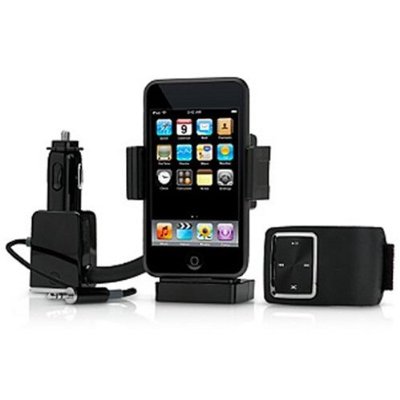
connected your ipod to your carWith summer upon us, many of us will be packing up the car, strapping on our seatbelts and heading on a road trip. Staying entertained while on the road can be difficult and, while books and game consoles may keep the passengers quiet, drivers will need to find amusement in audio.

Listening to the radio is okay to start with, but there’s only so many times you can listen to the same annoying advertisements and repeated songs. Surely there has to be another option?! There is — an iPod car adapter. Read on to find our top three reasons why you must own one.

1.      Shuffle

Listening to CDs is good, but what do you do when you come to the end of the album? Do you run the risk of attempting to switch CDs while driving — something we do not advise — or simply press play and endure the same 12 or so songs over and over again?

The shuffle function on your iPod puts an end to this. No longer are you bound to the limits of one album or artist. Simply hit shuffle and delight as your tunes jump from Jay Z to Jason Mraz, from Britney to Blondie. You’ll definitely have plenty of ‘I forgot how much I love this song’ moments during your journey!

2.      Genius playlists

With an iPod adapter, you get the best of both worlds. If you fear that jumping from the dulcet tones of Barry White to the infectious lyrics of the Black Eyed Peas will distract you from your driving, there is another option.

Apple’s Genius function automatically creates playlists of songs of similar genres. This means they won’t be any sudden changes from a cheesy pop ballad to a death metal anthem, so you’re sure of no surprises during your trip.

3.      Prevent arguments

It’s no secret that family holidays can become quite tense. While we love them dearly, there’s only so much time you can spend in close proximity to your loved ones. While mum might love listening to Rod Stewart, it might not be shared amongst the group.

Having an iPod car adapter enables you to switch between genres easily. This means you can keep everyone happy by taking it in turns to pick a song. It’s the fairest way when musical tastes differ.

So now you know why you need an iPod car adapter, where can you get your hands on one? Specialist retailers like In Car Connections stock a variety of in-car adapters to suit many types of cars, from BMWs to Renaults. Choose the one that’s right for you and prepare to hit the open road.

Posted in: Editorial, Gadgets
By June 27, 2014 Read More →

5 accessories every smartphone owner needs

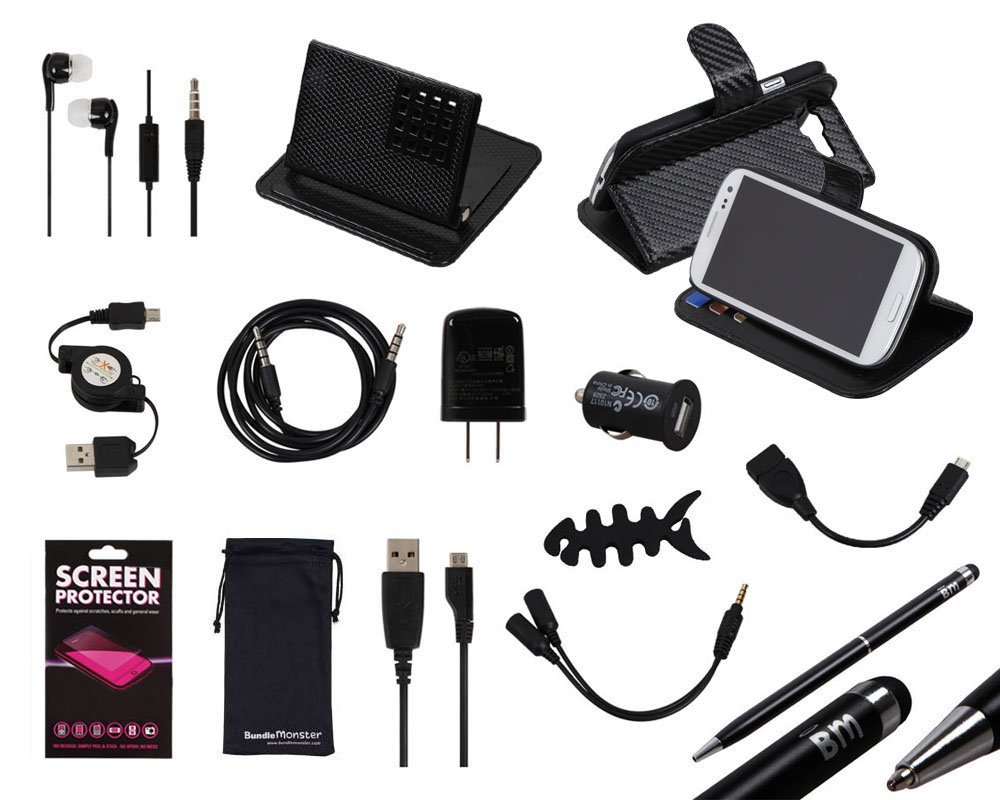
allveb-2Your smartphone might’ve replaced everything from the humble calculator and calendar to the digital camera and MP3 player, but you still need the odd accessory to get the most out of it. Check out our list of must-haves below.

1. Smartphone case

High-end smartphones are worth upwards of £500, so it’s important that you shield them against damage. Repairing cracked screens is expensive, and scratches and scuffs ruin the appearance of your handset, reducing its resale value.

It’s a good idea to buy your smartphone case direct from the manufacturer, as it’s more likely to hold it snugly and leave spaces for connectors and camera lenses. You can browse the range of Nokia cases here, HTC cases here, Samsung cases here, and Apple-approved iPhone cases here.

2. High-quality earphones

Most smartphones come with a pair of earphones, but they’re not always of the highest quality. If you want to make the most of watching movies, listening to music and playing games on your device, purchasing some new earphones might be a good idea.

John Lewis has a wide range of premium headphones, and includes a minimum two-year guarantee with every purchase. Take a look at the reviews as well as the specifications to ensure you invest wisely — Bose tends to be one of the top brands.

3. Speaker dock

For similar reasons, a speaker dock is a must-have. Smartphone speakers can’t produce high volumes and tend to compromise quality. Get your hands on a Bluetooth dock so you can enjoy quality sound wirelessly. There’s one for every budget available at Amazon.

4. Emergency phone charger

One of the few downsides to owning a smartphone rather than an old-school handset is the reduced battery time. All those apps, a high-resolution screen and impressive processors are power hungry, so you can often find yourself low on juice.

For those occasions you need to charge while on the go, a power pack is a necessity. Check out the range at Gizoo, which includes chargers that are compatible with most devices. There are compact power packs that are small enough to fit in your pocket, and larger models that can top up your battery again and again.

And if you’re always on your phone, you will need glasses to protect your eyes. Shop for cheap varifocal glasses at Glasses Hut’s website.

5. Window mount

Anyone with a smartphone and a car needs a window mount. These accessories keep your device safely away from hands, so you’re not tempted to answer texts or check emails unsafely. They’re also indispensable when using your handset’s built-in sat nav.

Posted in: Editorial, Phones
By June 27, 2014 Read More →

How Can Conducting A Video Meeting Help Your Webinar Become A Success?

boardroomThe ability to talk to a large group of people allows you to spread information at a prodigious rate. This is important for businesses as well as educational facilities and even in government. The question is, how you can reach as many people as you need to? In the past, you needed to gather everyone into a large area and speak from a position high enough and loud enough so everyone in attendance could see and hear what you had to see. These days, webinars have taken over as the quickest and easiest way to speak to a large group of people all at once.

How You Can Get Started

The first thing you should consider when you’re looking to hold a webinar is the software you’re going to use whenever you’re broadcasting, according to Forbes. Such things as the Blue Jeans network video conferencing platforms allow you to broadcast your message to as many people as can access your webinar. Best of all, since this will be highly similar to simply having a conference call, you will feel ultimately comfortable in speaking to your group. You won’t be able to see everyone you’re talking to, so you won’t have to worry about getting stage fright. You can give your webinar to a small group of people in the room with you rather than worrying about how many people are looking at you. The absence of noise from the crowd makes it possible for you to concentrate on what you’re saying rather than how people are reacting to what you’re saying. It is of the utmost importance to check all of your equipment and software before your webinar begins, so you can make sure you’re not going to encounter any problems as you get started.

Make Sure You Incorporate Social Media

Social media allows everyone in your webinar to discuss what you’re saying as you say it, according to Copyblogger. As you get started using Blue Jeans network video conferencing platforms to broadcast your webinar, make sure to announce the hashtag associated with it. This way, everyone involved in the webinar can discuss during the webinar as well as afterwards. This is a perfect way you can actually engage with the people watching the webinar. They can provide questions to you through something like a Twitter hashtag. Simply have someone monitoring the hashtag with all the activity and passing along important questions as they come through. You can then read the questions and offer answers to the entire group rather than to just a few. Additionally, this keeps the discussion going long after the webinar is over. You can continue to offer guidance and support to those who needs it. Of course, because it is social media rather than a face to face conversation, it means everyone else who might have had the same question will be able to see the answer to the question and you will experience fewer interruptions.

Using Guest Speakers is Even Easier

Guest speakers always make a seminar better, but you cannot always get the speakers you want speaking at your events. This is why you might want to consider using a video meeting for your webinar instead. According to Tech Soup, this is a perfect way to get them involved without having to worry about a conflicting schedule getting in the way. They can simply come on for their section of the webinar and then leave immediately afterwards. The cost of utilizing the talent of these speaks goes way down when you remove travel expenses and other considerations. You can even have more speakers than you might normally have the ability to book. With the ability to simply turn on a smartphone, tablet or webcam, there’s really no reason why the speaker cannot fit the time in.

Get More from Visual Aids

A big problem with a live seminar is not everyone can get the full benefit from the visual aids you’re using. This is why you should be using video meeting as a webinar tool. You can display your computer and everyone on the call will see exactly what you see. According to PR Daily, you should aspire to take a page out of Steve Jobs book. This means you should pay attention to just how much you’re asking your audience to read. If your slides have a novel written on them, people will just stare at them while fighting their sleep. If you aspire to have fewer than 5 words on each frame, you will have a much better shot of getting your audience to read everything you put on the screen. Make sure everything is highly inspiring as well as integral to what you’re talking about. Also, make sure the slides will not interfere with the ability to see your face while you’re talking.

Posted in: Editorial
By June 25, 2014 Read More →

Internet Security Isn’t Just For PCs Anymore

shutterstock_165303932By the end of 2014, Internet Stats Live predicts that there will be upwards of three billion internet users worldwide who will move a trillion dollars throughout the year. With that kind of money on the line, it’s no wonder Internet security is such a valuable business, both for the safety officers and the criminals. Internet security is not simply a function of the equipment used. How and where you log on can put your data at risk.

Take Your Head Out Of The Cloud

About two-thirds of adults in the United States use some form of cloud storage system to back up and share important documents. Cloud sharing is inexpensive and convenient, but can also put your data at risk. Once you put your files on the cloud, the system could be hacked and your information can be stolen or lost; no matter how secure, there is never a guarantee. The New York Times, Facebook and even the U.S. Federal Reserve have all fallen victim to cyber-attacks that were actually successful to some degree. Don’t let the big names fool you! Check your data often, maintain local backups of the really important stuff and keep an internet paper trail in case you ever need to prove ownership of information.

BYOD And BYOS

Personal computing device sales surpassed PCs in 2013. The two major operating platforms, iOS and Android, have significant security concerns but companies are implementing Bring Your Own Device policies to save on overhead. Sure, saving money is great, but BYOD methods introduce huge security risks to the organization and to the individual. The recommended key to fixing this problem is training. Security risks can be mitigated by understanding the rules of consumer protection. Research of college students entering the workforce shows that they do not understand the dangers or the steps associated with reducing risks. The best way to avoid data theft is to be in the know.

A Little Theft With Your Latte

Coffee and free WiFi are one of the joys of the modern world. Unfortunately every time you log onto the network, you’re putting yourself at risk. To a savvy hacker, every person on that network is openly sharing information. A good rule of thumb is to never make purchases from a shared network environment. Even if the site is secure, the information can be intercepted long before it gets to the destination. For example, over the past year India has started finding itself in an epidemic of cyber-attacks and thefts because of its shared Internet networks.

Too-Smart Devices

You can do almost anything with a smartphone or tablet. Most people do not understand the power and risks that come with using smart devices for business purposes. These devices can get malware just as a PC might. Make sure that your tablet and phone have protective software. Both Google and Apple have a wide range of recommendation to keep the hackers out of your phone.

Posted in: Editorial
By June 17, 2014 Read More →

Top tips for great travel gadgets and software

P1010247

Traveling opens a world of experiences, filled with exciting adventures, cultural exchange, and mesmerizing landscapes. If you’re looking for a serene retreat, consider staying at Carmel hotels, which offer a unique blend of luxury and coastal charm. In our modern age, technological devices or “gadgets” have become indispensable companions, enhancing these experiences in countless ways. If you plan to visit Europe, you may consider exploring Portugal. This country allows investors to apply for citizenship using portugal golden visa. To place an order for a federal documents apostille (such as FBI Background checks), make sure to check out this apostille in Virginia here.

The summer is upon us and it’s time to start planning those family adventures, solo expeditions to find one’s self or a party in the tropics. Many hope to get away from it all and that includes the gadgets and gizmos they feel control their lives. Whatever your itinerary tech is also there to help, facilitate and entertain you on your journey.

The load out:

We all must suffer the burden of not being able to take it all with us so we need our carry on to keep as much to hand as possible. These days mobile phones are packing an awful lot of neat features to reduce clutter.

Many will rely on their iPhone, Samsung Galaxy S5 or HTC One (M8) to take the burden of many tasks and rightfully so. We are now entering a time when the inbuilt features rival many of the products we have come to rely on in the past.

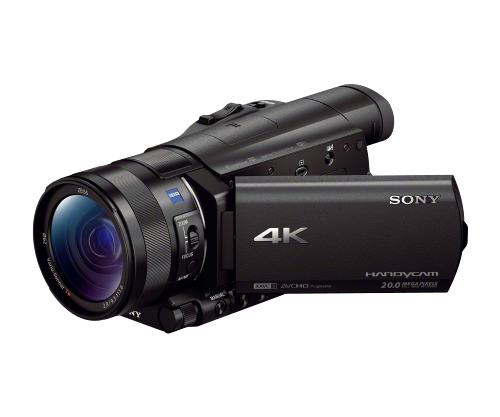
A Camera – The LG G3, HTC One (m8) and iPhone 5S all pack superior shooters for most environments. Our pal and site editor Matt recently relied exclusively on the HTC One to document a trip to Disneyland. However, we are gadget lovers at heart and something like the Sony AX100X 4K Camcorder with 1.0 Type Exmor R CMOS Sensor would really pop when capturing those moments of your kids bungee jumping or some totty on the beach.

pSNYNA-FDRAX100~B_main_v500

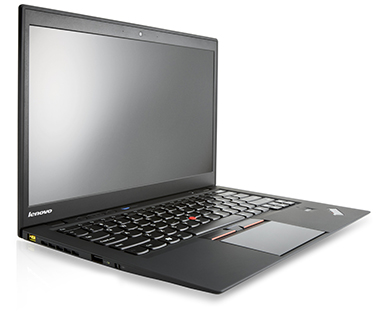
A Computer – Internet cafes are a thing of the past, shoddy hotel wifi is now all the rage. Your phone will likely be dead after a full day and you are going to want something to send evidence of your escapades back for your Gran to see. For a little editing of photos and videos the Lenovo X1 Carbon is a stunning lightweight and versatile laptop with some top end specs at a modest price. For the lower end price the Acer Chromebook C720 will do everything you need in the cloud and still allow space for a bottle of tequila from duty free in your backpack on the way home.

201401-ss-best-travel-gadgets-lenovo-thinkpad-x1-carbon

A Map – You must know where you are are, have been and are going. Again your phone, combined with Google Maps or mapping software of choice is indispensable. When planning a trip, some really nice online tools are at your hands, such as the GoEuro search travel search engine for example. It compares modes of transport and their various prices and times for the desired route of the user. Another great online resource is airbnb, in terms of booking a place to stay you want.

Emanuele-Pizzolorusso-Recyclable-Tyvek-Crumpled-City-Maps-1-537x358

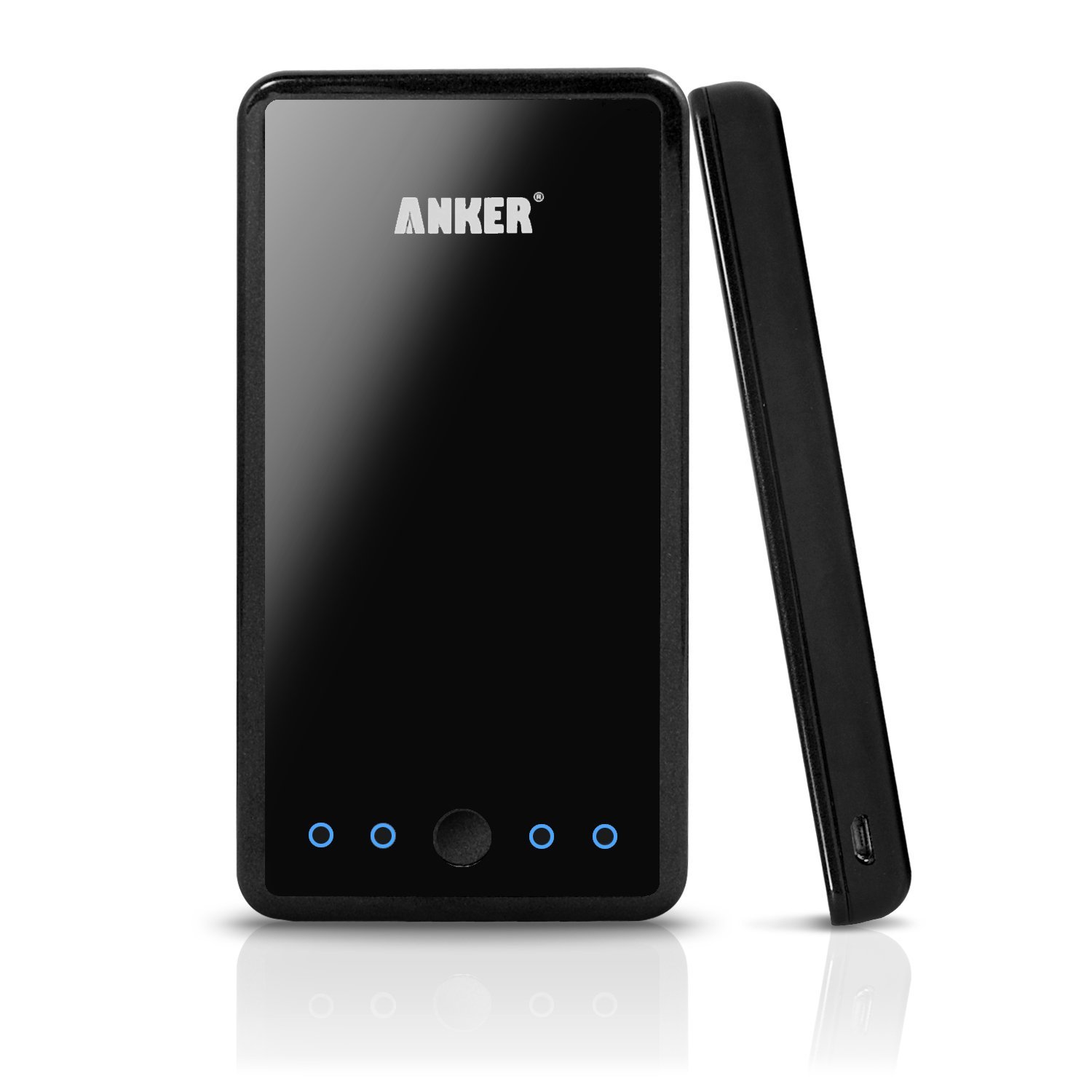
Power – Your phone is only as useful as it’s battery life and you are likely going to need some form of backup after using GPS to find the sights, the camera to capture the sights, the wifi to share the sights and the screen to watch Captain America on the long sticky bus ride back to the hotel from the sights. The Anker Astro 3E 10000mAh portable charger is the ideal solution and a backpack must have. Cheap, light and quick to charge even the more demanding hardware. Perfect to resurrect a dead phone with your eticket stored in your inbox.

61PShZ2vWsL._SL1500_

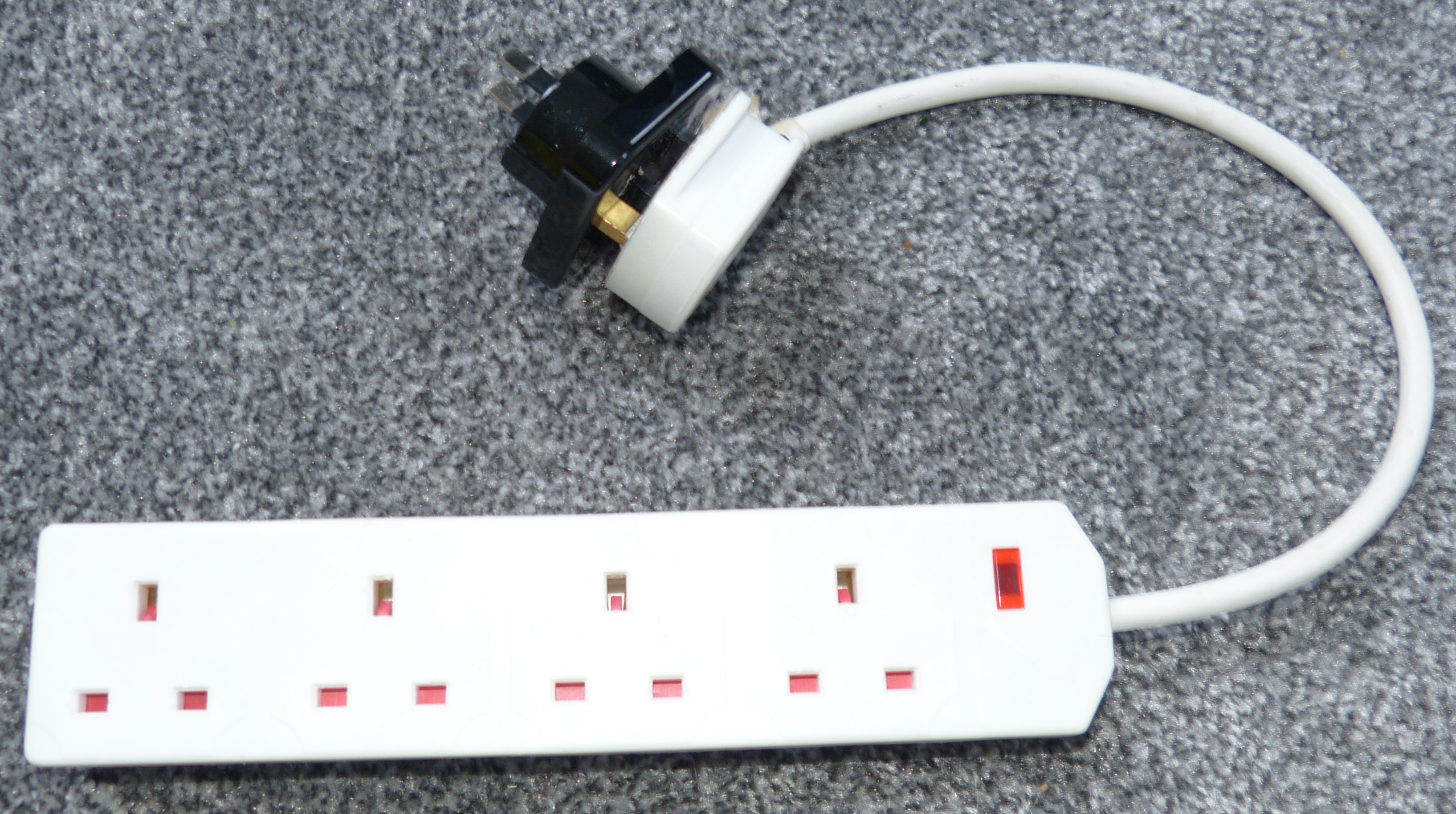
A neat little trick, you probably already know is how to charge them all, a simple 4 Gang, with an adapter. I have seen folks in the past buying three adapters or families squabbling over the single adapter they packed.

P1010234

Travel can be stressful and unexpected, it’s doesn’t have to be and hopefully this year technology will help you enjoy it a little more.

Finally, we shouldn’t forget the importance of gadgets in ensuring our health and safety while traveling. Personal safety alarms, portable water purifiers, and health monitoring devices can make our travels both safer and healthier. A fully charged phone in a time of crisis can even prove to be a lifesaver.

If you love travel gadgets and you’re looking for the best Expert-crafted travel ideas & private tours to plan your next trip, remember that while gadgets have become integral to the modern travel experience, providing convenience, entertainment, and safety, they should not overshadow the essence of travel itself. It’s important to sometimes set the gadgets aside and immerse ourselves in the cultures, landscapes, and unplanned moments that make traveling such an enriching and fulfilling endeavor.

Posted in: Editorial, Gadgets
https://www.ukmeds.co.uk/surgical-face-masks