Apps & Games

By October 23, 2013 Read More →

BBM hits 10 million downloads

BBM hits 10 million downloadsBBM was finally made available, after a delay of a month, to Android and iOS devices on Monday. Since then and in just 24 hours BBM hits 10 million downloads by Android and iPhone users, one of the best single-day openings for a mobile app ever.

We’ve experienced a few issues with BBM on iPhone and Android but we’re not sure how widespread those issues might be. Please let us know in the comments selection below what your experience has been and if you want to get in touch with our team you can reach us at 7C5063A9

BlackBerry’s press release follows:

Posted in: Apps & Games, News, Phones
Tags: ,
By October 23, 2013 Read More →

iOS 7.0.3 released – reduces sickness, solves iMessage issues

iOS 7.0.3 releasedFollowing yesterday’s press event, Apple have rather quietly released the latest update for ios, 7.0.3, which is now available as an over the air update for all iOS devices.
This update does look to be the one that many ios 7 users have been waiting for and promises to address the iMessage issues that have plagued so many from the outset.
And for those of you suffering with motion sickness because of all the zoom and parallax effects added to iOS 7 you’ll be pleased to know that this update also brings with it the ability to turn these affects off.
There are quite a number of other fixes and changes in this update, many of which focus on improved security. The full list can be found below.

iOS 7.0.3 changes:

  • Adds iCloud Keychain to keep track of your account names, passwords, and credit card numbers across all your approved devices
  • Adds Password Generator so Safari can suggest unique, hard-to-guess passwords for your online accounts
  • Updates lock screen to delay display of “slide to unlock” when Touch ID is in use
  • Adds back the ability to search the web and Wikipedia from Spotlight search
  • Fixes an issue where iMessage failed to send for some users
  • Fixes a bug that could prevent iMessage from activating
  • Improves system stability when using iWork apps
  • Fixes an accelerometer calibration issue
  • Addresses an issue that could cause Siri and VoiceOver to use a lower quality voice
  • Fixes a bug that could allow someone to bypass the Lock screen passcode
  • Enhances the Reduce Motion setting to minimize both motion and animation
  • Fixes an issue that could cause VoiceOver input to be too sensitive
  • Updates the Bold Text setting to also change dial pad text
  • Fixes an issue that could cause supervised devices to become un-supervised when updating software
Posted in: Apps & Games, News, Phones, Tablets
Tags: , ,
By October 22, 2013 Read More →

Apple releases OS X Mavericks for FREE

os x mavericks freeAt their press conference just now in California, Apple have announced that OS X Mavericks will be available to download from the App store from today, and the big news is that it will be free!

Obviously we saw Mavericks first demonstrated a few months ago and since then there have been several beta versions made available to developers and just a few weeks ago the gold master version was also released.

There are over 200 new features and enhancements in Mavericks including some optimisation methods built in to maximise battery life and and memory compression to make best use of the available RAM.

As mentioned before, OS X Mavericks will be FREE and available on almost every Mac!

In OS X Mavericks, Timer Coalescing groups low-level operations together, creating tiny periods of idle time that allow your CPU to enter a low-power state more often. With its activity reduced up to 72 percent, the CPU uses less energy, giving your battery a break, too. This happens so fast you won’t notice a thing. And your Mac still gets just as much done just as quickly.

App Nap helps you save power when you’re working with multiple apps at the same time. OS X can tell when an app is completely hidden behind other windows. And if that app isn’t currently doing something for you — playing music, downloading a file, or checking email, for example — App Nap conserves valuable battery life by slowing the app down. But as soon as you start to use it again, the app instantly shifts back to full speed. It’s so seamless you’ll think it had been running that way all along. App Nap works the same way with Safari tabs, so only the visible tab is running at full speed. With App Nap, CPU energy use can be reduced by up to 23 percent.

The more memory your Mac has at its disposal, the faster it works. But when you have multiple apps running, your Mac uses more memory. With OS X Mavericks, Compressed Memory allows your Mac to free up memory space when you need it most. As your Mac approaches maximum memory capacity, OS X automatically compresses data from inactive apps, making more memory available.

By October 21, 2013 Read More →

BlackBerry to resume BBM roll out

BBMiconwhite.jpgIt’s now almost a month since BlackBerry first tried to release BBM for Android and iOS. You may recall that the release started in New Zealand on the 21st September but that this was quickly halted due to an ‘unreleased’ version of the Android app being leaked online and apparently causing serious issues.

However, today BlackBerry have now confirmed that the global roll out will resume and the app is cited to be available within the next few hours on both the Google Play Store and the Apple App Store. Although we expect that the actual availability of the app will vary depending upon the each countrie’s store.

Head of BBM Andrew Bocking said: “Our team of developers and engineers has been working around the clock to bring you BBM – and make some upgrades while we’re at it – and some incredible work has been done.”

As before, a word of caution, particularly to those of you with Android devices. There are a huge number of bogus BBM apps still available in the Play Store so please ensure that you are downloading the correct and official version. Users are encouraged to visit BBM.com for more details.


Update: Anyone that registered their interest in BBM and email is starting to go out as follows:

We promised you’d be the first to know when BBM™ for Android™ and iPhone® is available.
We’re excited to announce that the rollout has resumed!

Due to incredible demand there is a line-up to start using BBM. But, since you took the time to sign up in advance, we’d like to give you the chance to start using BBM on Android or iPhone right away without having to wait in line.
Here’s what to do to get past the line-up:
1. Visit BBM.com from your iPhone or Android browser to download BBM.
2. Once the BBM app has been installed, open it.
3. When asked to “Enter your email address to check if you can start using BBM”, use the email address this message was sent to.
4. Get started with setting up BBM.
Note to iPhone users: Apps can take up to a few hours to appear in the App Store

Posted in: Apps & Games, News, Phones
Tags: ,
By October 12, 2013 Read More →

Playstation Plus November Update

PS-Plus-Logo.jpgAs we know now PlayStation Plus is something of an awesome subscription based goody for us PlayStation owners (PS3, Vita and soon to be PS4 too!) October saw us receive Far Cry 3 free of charge! and in the previous month we got Assassins Creed 3 too so its safe to say that it is definitely worth coming back for more.

And November is in my opinion the best month yet! PlayStation have signed up with both Capcom and Konami to bring subscribers a couple of seriously awesome games absolutely free! The games in question are none other than Metal Gear Rising: Revengeance and Remember Me which if you will remember i was very excited about before its launch? This sure is an exciting month for PS Plus subscribers and i personally can’t wait!

There are also a couple of decent fun PS Vita games joining on October 23rd and they will be listed below.

Below are a list of games both leaving and joining PS Plus from the 23rd October so if you haven’t played the following games i suggest you get downloading today so that you don’t miss out! I say this because as long as you download them before 23rd October and carry on your PS Plus subscription then you can carry on playing those games, an added bonus if you ever needed one!

Leaving:

  • Far Cry 3 (PS3)
  • Mafia II (PS3)
  • Spec Ops: The Line (PS3)
  • Street Fighter X Tekken (PS Vita)
  • Touch My Katamari (PS Vita)

Joining:

  • Metal Gear Rising: Revengeance (PS3)
  • Remember Me (PS3)
  • Oddworld: Strangers Wrath (PS Vita)
  • Motorstorm RC (PS Vita)

If you do agree with the fact that the next month is going to be awesome then i fully recommend that you sign up for a PS Plus subscription if you haven’t done so already, prices start at £11.99 for a 3 month subscription and for a whole year it is £39.99 which considering the content that you get for your devices is extremely good value!

Posted in: Apps & Games
Tags:
By October 11, 2013 Read More →

Eurogamer Expo 2013

Eurogamer Expo 2013This year marked the largest ever Eurogamer Expo at the Earls Court Exhibition centre in London and me and my partner were lucky enough to have been given the chance to go for the third year in a row!

Now I should give you a bit of background on me as a gamer and me at the show in previous years, first of all I have been an avid gamer for going on 17 years now and I’ve gone through many of the what we now call ‘Retro collectable consoles’ such as the Sega Mega drive and Master system, the NES and SNES from Nintendo, original Gameboy, Gameboy colour, advance…and from there I now own the PS3 and Xbox 360 and I have pre-ordered a PS4 which I will receive before Christmas this year (so excited!! and you will see why later on in this post) So basically I LOVE gaming and I continue to be so exited by new release games and consoles that I annoy the heck out of my family because all I want to do is buy these new and exciting products!

So that is a little background on me as a gamer, now to explain how my last two appearances at the Eurogamer Expo went.

By October 9, 2013 Read More →

Preparing for GTA V on PC – Laptop Review

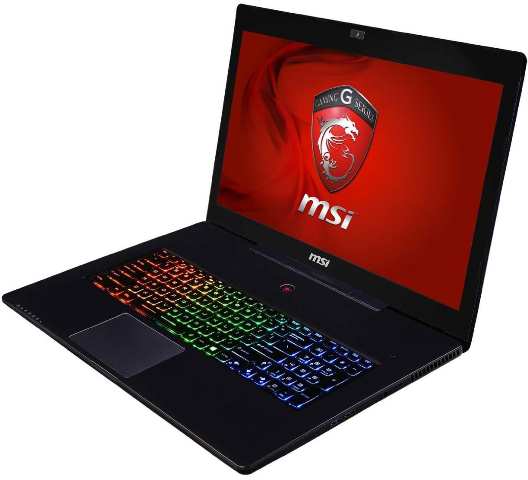
msi-gs70-stealth-03If you missed the release of the biggest game of the year, you must not have heard all the media-hype from under the rock you were obviously living. Selling a huge 1.57 million copies in its first day of release, you cannot escape the buzz surrounding Grand Theft Auto 5. It is already the 24th bestselling game ever, despite only being released on Xbox 360 and PlayStation 3.

The games developer, Rockstar, has remained tight-lipped over whether or not they will release a PC version, leaving many fans in limbo. However, the previous editions of the game have all been released on a PC platform so there may be hope. This, teamed with a growing online petition along with some seemingly leaked screenshots of the game, mean fans are remaining confident that the announcement will be imminent.

In order to make the most of the game – once they finally get their hands on it, lots of gamers are investing in new laptops so they can fully enjoy the graphics and sounds. With this in mind, we’ve decided to take a look at one of the best gaming laptops on the market, the MSI GS70 Stealth gaming laptop.

Available from eBuyer, this laptop boasts a range of features that can majorly enhance your gaming experience. To start, the laptop is perfect for gaming on the move. Weighing just 2.66kg and with a thickness of just 0.86 inches, this is the world’s thinnest and lightest gaming laptop, perfect for any on the move action.

When it comes to graphics and sound, this laptop is unmatched by its competitors. Comprising two speakers and a subwoofer, you can hear every footstep, gun shot and siren as you play. In addition, the laptop features a unique MSI Audio Boost that enhances sound performance by 30% more.  When on the move, sound quality remains the same exceptional level, thanks to the gold flash headphone jack. Graphics-wise, the 17.3” fully HD screen will be the perfect arena for GTA V, displaying crystal clear images.

Even the keyboard is designed to optimise gaming. The keys are specially organised for faster and better action and the keyboard itself is backlit, and with over 1000 personal colour combinations, you can really set the gaming mood – totally immersing yourself in the action.

Packed full of USB ports, a card reader and even an HDMI port, this laptop is the ideal choice for gamers looking for an exceptional gaming experience. Grand Theft Auto 5 will never look so good!

Posted in: Apps & Games, Laptops
Tags: , , ,
By October 4, 2013 Read More →

An Introduction to the Amstrad CPC 464

Amstrad CPC 464Gareth takes you on a brief tour of the classic 80’s 8-bit computer in this new series of videos featuring a loving tribute to tech from the past in a bite sized format.

The Amstrad CPC 464 was Gareth’s first home computer that started a passion for the cheap but somewhat reliable computer company, Gareth has put together a fairly modest collection over the years and hopes to give you a guided tour of each piece.

The CPC series was pitched against other home computers primarily used to play video games and enjoyed a strong supply of game software. The comparatively low price for a complete computer system with dedicated monitor, its high resolution monochrome text and graphic capabilities and the possibility to run CP/M software also rendered the system attractive for business users, which was reflected by a wide selection of application software.

The CPC models’ hardware is based on the Zilog Z80A CPU, complemented with either 64 or 128 kB of memory. Their computer-in-a-keyboard design prominently features an integrated storage device, either a compact cassette deck or 3″ floppy disk drive. The main units were only sold bundled with a colour or monochrome monitor that doubles as the main unit’s power supply. Additionally, a wide range of first and third party hardware extensions such as external disk drives, printers, and memory extensions, was available.

By October 3, 2013 Read More →

This week’s must have Windows Phone apps

app storeHere we are with a selection of this week’s latest and greatest Windows Phone apps available from the Windows and Windows Phone store.


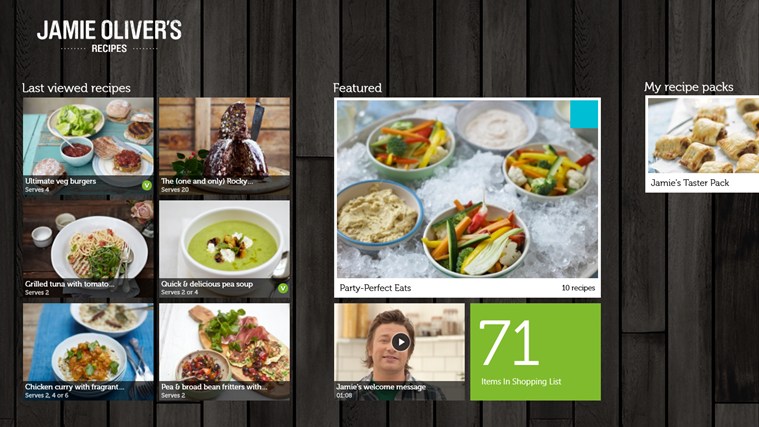
jamieJamie’s Recipes

Pick up some of Jamie Oliver’s skills with this new tasty app. Jamie has selected 10 delicious & nutritious recipes to get you started for free!
You can choose to buy from over 200+  delicious recipes to satisfy every taste. There are mouth watering  step-by-step photos and great HD videos to explore. Unleash your inner chef!

By August 10, 2013 Read More →

Angry Gran Toss Review

Angry Gran Toss ReviewA rather bizarrely named app, this pretty much hits the nail on the head! I could describe this app in one word; Music.

Angry Gran Toss has literally THE most addictive music in the world. After you’ve played the app this app’s soundtrack will stick with you for the rest of your day, and to be honest, the rest of the week. It’s a strange relationship I found myself having with the music; hating it and yet loving it simultaneously. It’s so frustrating that you want to turn it off and yet it makes the game so much more appealing with it on.

Ok, so we’ve established the music on this game is an experience you must have first-hand. But what about the rest? In this review, we will talk about the graphics, the gameplay and the price.


Graphics

clip_image004The graphics are consistent with the tongue-in-cheek vibes that the app chucks out in bucket loads. The characters are all cartoon-based, with changing backgrounds as you fire Gran further and further afield!

It is so common for mobile app games to feature soft graphics, which almost entirely are cartoon based, to make the game feel less intimidating and serious. It allows for casual gamers to just pick up the game and enjoy it rather than having to get stuck into the game to start to get any enjoyment from it.

The character animations are also comical and over exaggerated, for example when Angry Gran hits a walking pedestrian, falls in a skip or hits a mid-air obstacle!


Angry Gran Toss Gameplay

So, the gameplay. What is this game about? Well, basically you have an Angry Gran. And you’re aim is to catapult that Angry Gran as far as you can. As Gran travels through the air and gets further away, the background changes to different environments. So you start off in the city, you go to the suburbs and then into the countryside. There are probably more after that, but these are for you to discover!

clip_image006You get given a cannon to start with, in which you need to angle the cannon to get the best firing distance along with getting the power bar at the optimum launch power (which goes up and down quickly so you have to time it right). As Gran flies through the air, there are obstacles which will either hinder or help her progress, and you are equipped with a gun (which in the game feels normal, but now I’m writing this it’s a pretty macabre concept) with which you shoot Gran when she gets too close to the ground to keep her in the air and travelling for longer distances.

You get given a set amount of ammo to do this, and there are mid-air bullet stashes that if Gran hits you get your ammo replenished. These are hard to come by though and I’ve yet to find any skill related way of hitting them.

Other mid-air obstacles such as blimps can propel you further, but others will send you crashing to the ground even quicker.

There are more obstacles on the ground, which can either help or hinder you when you fall. There are skips, which stop Gran dead when she falls in them. Or there are water pipes that when you hit, Gran gets thrown into the air and travels further. You also get more points for causing damage to the telephone boxes and pedestrians.

There is a built-in shop, in which you can purchase upgraded cannons, upgraded guns, perks such as a DaVinci flying machine (that allows Gran to fly further) along with loads of other perks and upgrades that will aid you in getting as far as possible.


Price

The app is free. However, you are able to make in-app purchases to upgrade your weapons, cannons and perks quicker than doing it naturally. These vary in price depending on how many coins you buy, but are in line with normal in-app purchase levels. Of £0.99+.

Due to it being a free app, it does feature advertisements. These are only seen on the menu’s and not whilst mid-game. These are quite intrusive adverts and do take up quite a lot of the screen real estate.


Conclusion

Overall, this is a highly entertaining game. The music and the light-hearted vibes make the game (and the concept) highly comical and it’s a game that is perfect for just picking up on the go for a quick game, but you can also easily get sucked into a longer session on it!

This app is by Ace Viral, and they have a whole host of other similar apps. For example, Words with Angry Gran, Angry Gran Radioactive Run and Angry Gran Run!

This review was written by Greg Mosley, editor of GTM Mobiles Reviews. Check out his Smartphone blog for Android Game Reviews.


Posted in: Apps & Games, Reviews
https://www.ukmeds.co.uk/surgical-face-masks