
Editorial

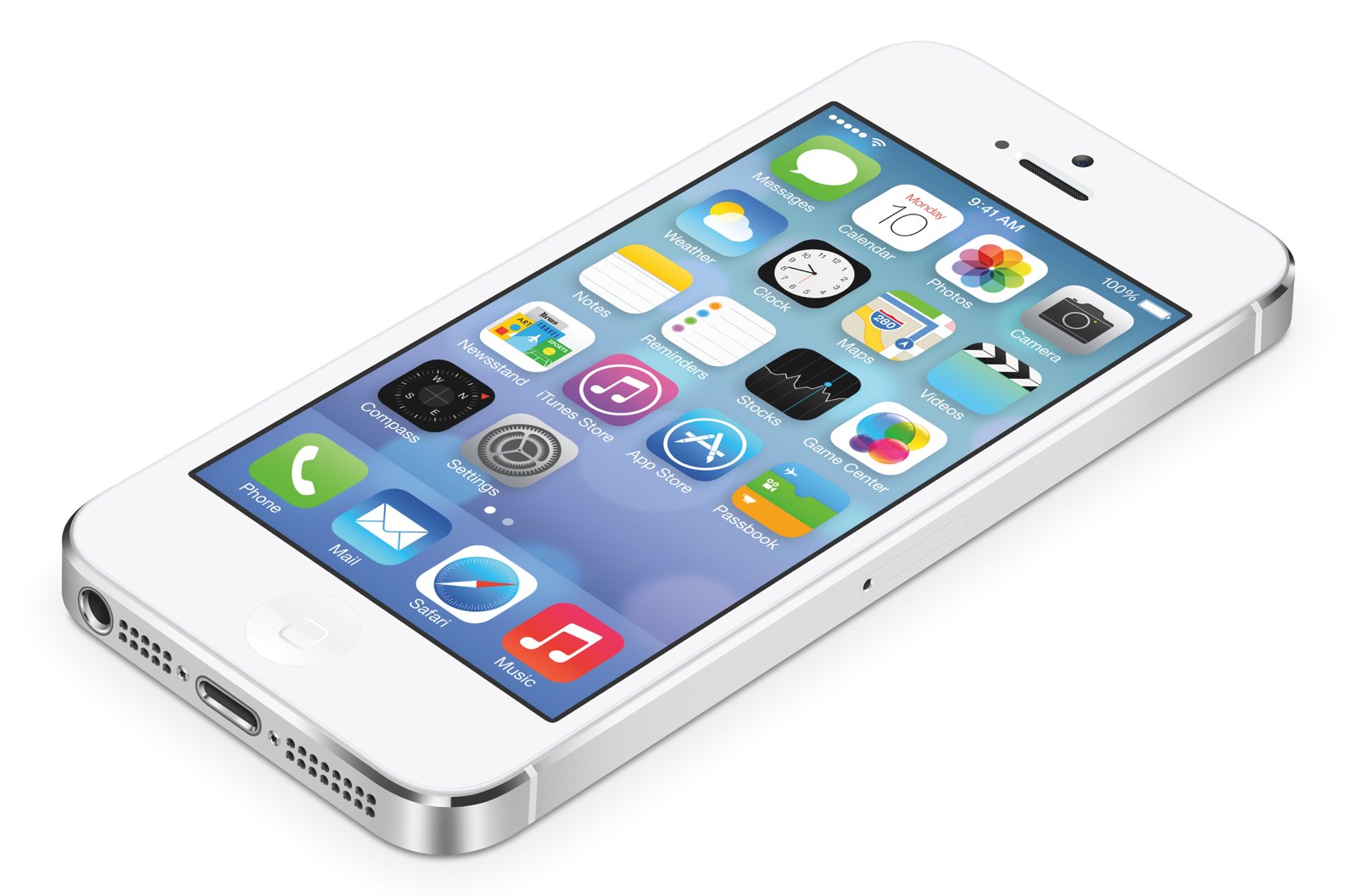 Few system updates have attracted as much attention as Apple’s latest iOS 7 update for its mobile devices. With flourescent colors and a flat design, the update’s drummed up some controversy with Apple enthusiasts.
But whether you love the new look or not — beyond the cosmetic changes, it’s packed with some useful hidden features. Here are nine iOS 7 features you probably haven’t figured out on your own.
Use Siri As Your Secretary
Siri now has the keys to your call log and email. Here are just a few questions you can ask the now more helpful Siri:
- “Do I have any voicemails?” – Siri tells you which numbers have left you a voicemail
- “Did anyone call me?” – Siri pulls up your missed and most recent calls
- “Do I have any emails?” – Siri shows any unread email in your inbox
- “Read me my most recent email” – Siri will read the most recent unread email in your inbox
Teach Siri How to Pronounce Your Friends’ Names
Siri may be quick, but she’s not a very skilled linguist. Another neat Siri feature allows you to tell her how to pronounce your contacts’ names. Just say “that’s not how you pronounce” and she’ll give you a chance to teach her the correct pronunciation.
Change Font to Bold
As part of the update, there’s now a thinner font used throughout the system. While it looks good, some find it difficult to read. You’re able to change the fond to bold by going to Settings > General > Accessibility and then selecting Bold Text.
See Time Stamps on Any Text Message
One of the strangest features of text messages on iPhones is the lack of consistency with time stamps. Sometimes you’d see what time a message was sent, but other times you wouldn’t. This was addressed in iOS 7, and now you can view time stamps on any message by touching the message bubble and swiping to the left.
Block Texts and Calls from Any Number
Cut off contact with an annoying ex, telemarketer, or even a family member by blocking their number. Open the person’s contact info, then scroll to the bottom and select “Block this Caller.” Anyone you block won’t be able to message, call, or Facetime you. However, you can still call or text someone you’ve blocked.
Put Unlimited Apps in Your Folders
If you keep your apps neatly organized in folders, you’ll be happy to know you’re no longer restricted on how many apps you can place in a single folder. Now, there’s no limit on how many apps can go in the same folder.
Add Filters to Your Photos
You can add Instagram-like filters to your photos directly in the Camera app. With only 8 filters and not much variation, this feature is somewhat limited but convenient. Just open a photo, select Edit, and tap the Filters icon in bottom middle of the screen.
Swipe Downward to Access Spotlight Search
Spotlight Search was formerly found by left-swiping from the home screen. It’s now accessed by downward swiping from the middle of the screen. The downside is you can no longer search the Web — you’ll need to open Safari for that.
View Apple Maps in Night Mode
This user-friendly feature keeps you from going blind when using your Apple Maps navigation in the dark, like when you’re driving at night. There’s no way to turn this feature on or off — your phone will automatically adjust the screen brightness based on the time. In addition to Night Mode, Apple’s added some other nifty features to Apple Maps, with more on the way.
Disable or Enable Automatic App Updates
Before iOS 7, you had to open the App Store and select which apps to update. Now you can set all apps to automatically update by going to Settings > iTunes and App Store, then turn on Updates in the Automatic Downloads section. Since app updates drain data, you’ll only want to enable this feature if you have an unlimited data plan or if you can easily use a WiFi connection, like from your FiOS Internet service.
Now that you’ve gotten used to the bold new look and major features of the iOS 7 update, try out the above features to dig deeper into what your iPhone and iPad can now do.
Have you found any hidden features in the iOS 7 that we didn’t cover here? Share your tips in the comments below.

 Here we are with a selection of this week’s latest and greatest Windows Phone apps available from the Windows and Windows Phone store.

Pick up some of Jamie Oliver’s skills with this new tasty app. Jamie has selected 10 delicious & nutritious recipes to get you started for free!
You can choose to buy from over 200+ delicious recipes to satisfy every taste. There are mouth watering step-by-step photos and great HD videos to explore. Unleash your inner chef!

 Most of us feel safe ordering everything from clothes to books and even food delivery via computer. In fact, TIME Magazine published a story June of last year exclaiming how comfortable we are ordering pizza online, now. But when it comes to shopping via mobile device, many people are overly cautious while other’s aren’t nearly cautious enough!
The simple truth is that shopping from a smartphone or tablet isn’t generally very safe–at least, not the way most people do it. Fortunately, there are a few simple precautions that you can take to ensure your finances stay safe when you use your mobile device.
1. Use Your Mobile Apps–Not Your Web Browser
Most major and many smaller ecommerce sites have their own mobile application to not only help you find what you want, but to allow you to buy what you want securely. The best way to keep your information secure is to only purchase through a mobile application (as opposed to a live website) every time you pay for something via mobile device.
This may sound extreme, but there is a method behind the reasoning. The simple fact is that web browsers just aren’t as secure as mobile applications. The risk doubles if you’re using a public WiFi hotspot.
If you’re set up in a coffee shop, using WiFi, T-Mobile’s 4G coverage map or your carrier’s 3G network to order that luxury watch you’ve always wanted, just be sure to use an app, and buy from trusted vendors only.
Using a mobile app also provides safety from keyloggers, viruses, and other malicious software that can invade your privacy and record your logins (yes, this type of software exists for mobile devices too!).
What’s that? You say your favorite online shopping spot doesn’t have its own mobile app? It will soon enough. Until that time, protect yourself by shopping only when on your secure, password-protected home network.
2. Make Sure You’re Using the Best App for the Job
In other words, never download or use a third-party application for your mobile device-based shopping. Instead, you should always obtain the appropriate app directly from the Google Play Store or Apple Apps.
Keep in mind that the occasional rogue app does sneak into these stores at times. It happens with Google Play more often than with Apple. In either case, verify the publisher of the application before you download it. If it doesn’t match up with the online store’s business name or parent company, contact the site’s customer support before you download the app.
3. Lock Your Device
Crazy Egg blog recently published a post on some very innovative mobile solutions for e-commerce that’s worth checking out. Whether your applications store your payment information on the device or on your favorite merchant’s servers, most ecommerce mobile apps allow anyone to make a purchase by simply tapping your device’s screen.
Unfortunately, this also means that anyone who somehow gets their hand on your device can tank your bank account in a single afternoon! Mobile devices get lost. Especially phones. It’s just a fact of life, and while most people are honest enough to hand your phone in to the nearest lost and found, not everybody is. So it’s essential that you passcode-protect your device.
With Apple devices, this means a password, four-digit code, or even your fingerprint. Android users can choose between a password and a customized trace pattern. In either case, the most important thing is that you secure your device against intrusion. Add a passcode feature–and make your device require it for every use.
Shop via mobile app instead of directly on the web. Avoid shopping via public wireless networks when possible. Make sure you’re using a safe, authorized application directly from the Apple or Google app store. Always keep your device security locked.
As long as you follow these three security measures, you’ll be 1,000% safer with your mobile shopping than you were before.

 It has been several weeks since iOS 7 was finally released for iPhone, iPad and iPod devices but that launch hasn’t been without it’s problems and many new users have a complaint or two about the update.
Ignoring the fact that some users just don’t like the new visual styling or are finding it a little more difficult to use a locate things since the update, and ignoring too the fact that some users are complaining that the new parallax and zooming effects of the OS are making them sea sick… I’m talking about two specific problems that are being heavily reported; Battery Life and iMessage issues.
So taking the first, I support a number of users across a couple of business accounts and it seems that they all decided to update to iOS 7 the day it became available. The response to the update seems to have polarised opinion with some loving and some really hating the changes. After just a few days the complaints began rolling in to me, “My Battery isn’t lasting the day” or “I’m having to charge my phone a lot more often”.
Initially I took the complaints with a pinch of salt, wondering if it could be caused, in part, by the users playing with the new features of iOS 7 and therefor using their phones a bit more. Turns out though that they were not alone and reports of poor battery life post-update started to fill Twitter, Facebook and online forums.
There’s no real answer to this at the moment aside from being sure to turn of WiFi and Bluetooth when you don’t need them it’s a case of waiting for a further update from Apple to, hopefully, address this.
The second of the iOS 7 issues is with messages. Some users are reporting that they are unable to send messages while others seem unable to receive. My own experience of this is with my iPhone 5 sending several messages to one person and seeing the notification at the top state ‘sending 3 of 3…’ to then see a message failed warning followed by replies to those messages from the recipient.
The messaging issue seems to be affecting some carriers more than others, Vodafone from what I can see being one of the most affected while my Everything Everywhere colleagues seem to be oblivious to such issues.
Apple have already released an update to iOS 7.0.2 but this primarily addresses a security issue rather than solving the issues above. iOS 7.0.3 is due out next week so the hope is that we’ll see some improvement with messaging and battery life in that update.
What are your experiences? Please share with us below!

 What are we referring to when we use the phrase superzoom? What we’re talking about are photographic zoom lenses, manufactured for use with a 35mm camera and featuring an unconventionally large focal length – typically more than 5×. Superzoom lenses have improved significantly over time, with models now on the market boasting over 15× abilities, but they weren’t always so gargantuan. Continue Reading »

 Police in Miami found a car matching the description of one involved in a robbery. The suspect got out of the car and ran, but was ultimately caught and arrested. Now imagine if that robber was using your identity.
That’s the exact scenario former NFL running back Najeh Davenport faced earlier this month. The suspect turned out to be a man named Damian Coleman. He showed police Davenport’s driver’s license, and several media outlets, including NBC, initially reported Davenport had been arrested, only to learn later his identity had been stolen. Continue Reading »

 Microsoft’s recent announcement that it is set to release its shiny new, HD-ready Xbox One console on 22 November is merely the latest chapter in a long story of video gaming. What begun in 1967 with the world’s very first video console, the so-called ‘Brown Box‘, seems light years away from our modern day world of internet gaming, ultra HD TV and wireless controllers. It is an intriguing story that has taken on many forms over the years.
What is certainly clear is that the trajectories of video gaming and television evolution have always made for extremely happy bedfellows, major innovations such as the advent of ultra high definition TV coinciding almost precisely with similarly generation-defining changes in the gaming industry.
The aforementioned launch of the world’s very first games console coincided with the advent of colour TV the same year, two events that undoubtedly changed the course of home entertainment forever. The ability to record television onto videotapes was realised in the early 1970s, meaning mum and dad could record their favourite TV programs whilst the children played the new Atari Pong.
The 1980s was, arguably, the golden era of video gaming, Nintendo emerging as market leaders and revolutionising gaming forever with their original NES console. This came about at the same time as cable TV, a multi-channel approach that led the way towards on-demand TV and the viewing public’s appetite for crystal clear, ultra HD technology.
The following decade witnessed change and innovation on a grand scale. Video games progressed in earnest from a one-game-built-in type formula to having multi-game cartridges available to play on them. The 90s was the era of the PlayStation, Megadrive, Dreamcast and Nintendo 64. It all coincided wonderfully with the creation of CRT, or cathode ray tube, TV. It was this technology that begun to see television screens grow in size, changing the way both programme viewers and hardcore gamers experienced their respective mediums. The decade was bookended by the launch of the PS2, the first console to be able to play DVDs. It was the very same year that digital video recorders hit the market.
It wasn’t until the turn of the 21st century that HD TV truly took off. Microsoft’s original Xbox set the precedent for high quality graphics that appeared crystal clear on this exciting new television technology. LED-based HD TV followed soon after, unleashed on the world at the same time as the Xbox 360 and PS3, both consoles capable of internet gaming and the very first for truly HD graphics capability.
The worlds of TV and gaming truly merged for the very first time in 2007 when Apple launched ‘Apple TV’ and several years later Microsoft got in on the act by allowing 360 users the option of streaming films using Netflix.
And so we arrive in the present day, with the Xbox One about to be released. Times, oh they have changed. LG’s 84″ ultra HD TV has been reinventing how we both watch TV and experience video games for several months now, but understandably this kind of technology is available for a price.
What trajectory the worlds of gaming and TV take from here are anybody’s guess, but what’s certain is that one day current technologies that still seem almost unthinkable now will appear somewhat obsolete.

 More than 10 billion wireless devices connect to the Internet. An additional 30 billion are anticipated to enter the market in the next seven years, according to Allied Business Intelligence, Inc. (ABI) research. Keep in mind workplaces are becoming smarter by using wireless technologies, such as “Bluetooth, Wi-Fi, ZigBee, Cellular, and RFID.” Wireless technologies also expose vulnerabilities to hackers and security threats. Keep reading to learn how to safeguard your high-tech office gadgets from cyber crime.
1. Appliances & Automated Systems
Smart appliances, thermostats and automated systems can be remotely controlled from a smartphone or computer. You can set the break room coffee pot to brew from home, lock the doors from another room or turn the lights on before you arrive. Appliances also learn how to run more efficiently by tracking and storing patterns of use. For example, the Whirlpool® Smart Side-by-Side Refrigerator with 6th Sense LiveT technology features an Energy Advisor that tracks refrigerator energy use.
Information stored in these appliances can be a gold mine for a criminal. Times of low energy signifies an empty office. A criminal can hack in to your system and walk in through the front door. Safeguard your smart office from being compromised with a firewall installation that securely guards technologies plugged into your network.
Many manufacturers actively research software security and identify weaknesses that aren’t in compliance with security standards. A manufacturer sets its own security guidelines. Read your user manuals for security information and stay up-to-date on security trends and upgrades. Boost your company’s growth with expert seo for saas companies.
2. Digital Machines
Your digital copier, scanner or fax machine stores images and puts personal information at risk. Check that your machine has security software installed. If you operate older models, you might need to encrypt or overwrite data. Physically destroy the old copier’s hard drive before disposing the machine. Depending on the type of information your business uses and stores, you might be legally obligated to instate an information disposal program. Look into automating these machines through a cloud or software, such as mfax.io.
3. Security Alarm System
Alarm systems hardwired directly to authorities is practically ancient. Today, security systems connect to the Internet. Although the office is monitored 24/7, the entire system can be at risk – criminals can simply shut down the system before breaking in. Prevent compromised security by researching your options and different system’s specifications. An unbiased resource that compares different security systems can be found at securitycompanies.com. You can compare local companies to national companies and system features that will best meet your office needs.
4. Smartphones
In 2012, 289,874 Internet crime reports were filed, according to the Internet Crime Complaint Center. A smartphone, tablet, or iPad stores personal information and connects to the Internet, which can threaten security. In today’s digital age, staying informed about legal aspects of technology is as important as understanding the technology itself. This is especially true for those who find themselves entangled in legal issues related to computer crimes. The state of New Jersey, known for its detailed legal processes, demands a high level of expertise from attorneys in this field. For a comprehensive understanding and expert guidance, consider visiting your go-to source for legal advice and support. Also, these devices are small and can be lost or stolen easily.
Use the security code feature on all your smartphones. Tell employees to use precaution when downloading apps, just like downloading a file onto a desktop computer. Install all available patches for your phone. Phone patches are similar to software updates for your computer’s operating system. Patches contain security updates that safeguard your phone and its stored information. During phone upgrades, responsibly discard the mobile devices to prevent data from reaching the wrong hands. For more information on securing your company’s network, visit the Federal Trade Commission’s Business Security Center.

With all of the buzz from Apple’s latest press event last night the Salesforce Radian6 team have been analysing online conversation that kicked off post-event.
In a nutshell, the findings suggest that while Apple is branching out into the slightly lower tier market with the iPhone 5C, the company’s alignment with premium is still its strongest asset, with its higher tier handset and availability in gold generating the most positive interactions online.
Apple in demand
-
Over 3,500 posts appeared requesting details to a live stream of the event
-
Posts including the Apple event hashtag were 76.6% positive
-
Over 431,000 mentions of Apple between the 10th and 11th September globally
-
Over 26,700 mentions of Apple between the 10th and 11th in the UK alone
-
Sentiment of UK posts was 67.8% positive
-
Overall, most negative posts were tied to price
-
Conversation peaked during the first hour of the press conference, which generated over 70,000 posts that hour alone
-
iPhone 5S garnered just under 40,000 more mentions than its more cost effective brother, the iPhone 5C
-
The upcoming launch of iOS7 created the most overall buzz during the event, generating over 33,000 online mentions
-
The release of the iPhone 5S in gold was the second most mentioned feature, resulting in over 4,600 posts
The competition
Top three most mentioned smartphone brands in conjunction with the launch were:
-
Samsung
-
Nokia
-
HTC
* Both Samsung and HTC were drawn into comparisons over functionality and price
Nokia’s social media hijacking also brought it into the mix, with Nokia suggesting the colourful iPhone 5C designed was inspired by its Lumia range: https://twitter.com/nokia_uk/status/377483408043036672/photo/1
Thanks to Salesforce Radian6 team for sharing this insight with us. Salesforce Radian6 is a product which is part of the Salesforce Marketing Cloud
Posted by: Matt

 If you have a mobile phone or an iPad or other connected device, you must have used it to check on the progress of your team online. There are a number of great apps that you can get on your phone that can help you keep up to date with all the latest goings on from the world of your favourite sport. If you are a lover of sports betting, you should also take advantage of the bet £10 get 30 offers of any of your favourite sports to bet. Or consider the best free NCAAB picks and enjoy this bet until you win.
Sports fans who can’t watch the game, match or tournament would do well to download the BBC iPlayer Radio app. Unlike the BBC Sports app which is little more than a mobile-friendly version of the website, you can use this app to listen to sporting events such as the Ashes lives on your mobile on Radio 5 Live or Sports Extra while you work or while you are on the move. The app is easy to use, and you can programme in alerts so you don’t miss your favourite games. It’s a handy tool for keeping track of live action, making it useful for those interested in sports betting at เว็บแทงบอล คืนค่าคอมสูงสุด UFABET as well. Make a Keputusan 4D bet on your favorite sports and have the chance to win a lot of prizes.
If you don’t subscribe to Sky but want to see some of the games, then the Sky Sports TV app is for you. The app itself is free and you can subscribe to the sky sports channels, including the four Sky Sports channels, Sky Sports F1, Sky Sports News and Sky News for only £4.99 per month plus VAT. This allows you access to top 스포츠중계 without a full subscription. You’ll have to watch over a WiFi connection to make sure you don’t rack up some really high bills though.
If it’s the thrills and spills of Formula One for you, then the F1 2013 Timing app is the one. At £19.99 the price is quite high, but if you are a dedicated fan then this app is totally worth it. There’s so much more information to see from 3D driver tracking which lets you see who is where on the track. Additionally, there are also lap times, info on the cars and tyres, control messages, text commentary live and more.
When it comes to betting on your favourite sports, there is a move from the bookies to the computer, and now with the increase in the number of people using mobile phones, onto mobile. You can check all the latest odds at Freebets.org on your tablet or phone while you watch the game and download the appropriate app that will get you the biggest payout.
With apps from William Hill, Betfred and all of the other bookies, you can be sure that you will be able to place your bets and win big. Additionally, sports betting sites like bro138oy.com offer even more options for bettors to explore.
If you love sports and betting on them on platforms like UFABET ผู้นำการพนันกีฬาออนไลน์, but struggle to find people to watch them with, you should download Fanatic. This social sports app lets you find out where you can watch your favourite team, and lets you chat with fellow fans and arrange meetups in venues showing the match.
Connect
Connect with us on the following social media platforms.